- Scenarios: eleven scenario types (TR 26.870 table D.1.1), from chat to agent-to-agent collaboration, with their call flows in clause D.1.2. The AI gateway of clause D.1.2.11 is defined but its test is still to be provided.
- Network profiles: ten deployment conditions (table D.3.1-1), from an ideal baseline and a 6G HRLLC profile to satellite and congested links, plus a lossy profile to find where a scenario breaks.
- A test run: one scenario, one network profile and one execution mode (remote or local), repeated; the output is a metric record (clause C.2).
- Source: TR 26.870 V0.6.1, a draft: annex B, clauses C.2 and D.1 to D.3, and annex E, a temporary annex.
How the testbed maps to the annexes
TR 26.870 V0.6.1 documents the testbed in annexes B to E. The sections of this page follow the order of the annexes, so that page and annex can be read side by side. The testbed itself is the 5G-MAG/6G-Testbed repository, with the directories aitestbed/ and netemu/.
| Annex clause | What it specifies | In the testbed (repository) | On this site |
|---|---|---|---|
| B.1 | Purpose, the common test platform of TR 26.934 (clause 5) it builds on, key capabilities, trace logging | aitestbed/ | How a test runs |
| B.2 | Architecture: orchestrator, scenarios, clients, netem, capture, analysis | orchestrator.py, scenarios/, clients/, capture/, analysis/; netemu/ | How a test runs |
| B.3 | How to run an evaluation; how to add scenarios and providers; vLLM; source location | configs/scenarios.yaml, configs/profiles.yaml, orchestrator.py options | Run the testbed |
| C.1, C.2 | The five questions on AI traffic; the method: scenario, metrics, profiles, two execution modes, test matrix, repeated runs | The test matrix of scenarios and profiles; local and remote execution | How a test runs |
| C.3 to C.8 | Results workbook (table C.3-1), agentic campaign (C.3.3), five assumptions with their metrics and conclusions (C.4 to C.8) | The metric records the testbed produces | Results |
| D.1.1, D.1.2 | Table of scenario types; procedures and call flows (D.1.2.1 to D.1.2.12) | configs/scenarios.yaml; scenarios/ | Scenarios |
| D.2 | Mapping of use cases to 6G media AI services and of test scenarios to those services | Not code; the rationale for the scenario set | Scenarios, last block |
| D.3 | The recommended network profile set (table D.3.1-1) | configs/profiles.yaml, applied by netemu | Network profiles |
| D.4 | The metrics, in four categories, with formulae and output keys | analysis/; netemu for packet metrics | Metrics |
| D.5 | Results for real-time video understanding | The VLM scenario and the lossy profile | Results |
| E | The netemu network emulator: usage, profile data model, packages, packet metrics | netemu/ | Network emulator |
How a test runs
Annex B describes the testbed and clause C.2 the method (TR 26.870 V0.6.1). A test run takes a scenario, a network profile and an execution mode, and produces a metric record; several runs are executed for each combination (the test matrix). The two execution modes differ in where the model runs, that is, where the model weights are loaded and the forward pass is computed (clause C.2):
- Remote execution: the inference engine is hosted by a third-party public cloud provider, beyond the control of the testbed. Traffic crosses the main network interface (
eth0), is captured incapture_<ts>.pcapand is impaired there by tc/netem. - Local execution: the inference engine is a self-hosted model (for example QWEN) on a server co-located with the testbed client, reached over the loopback interface (
lo). Traffic is captured incapture_lo_<ts>.pcapand impaired on the loopback path, emulating a radio link to a local edge server.
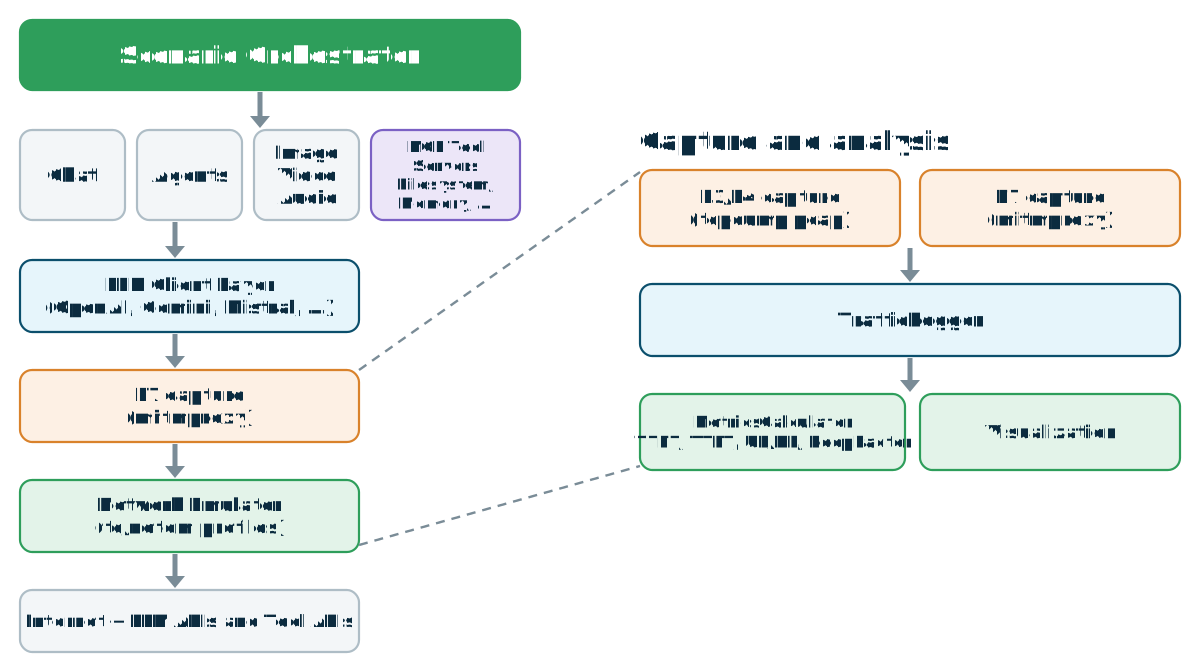
The parts of the testbed (annex B.1 and B.2)
The testbed builds on the common test platform of TR 26.934 (clause 5), which provides an end-to-end framework to run scenarios, emulate network conditions and log metrics reproducibly. Its key capabilities are orchestration of scenarios, provider adapters for commercial and self-hosted models, Layer 3/Layer 4 capture (tcpdump), optional Layer 7 capture (mitmproxy) and SQLite-based logging for large-scale analysis. The architecture is orchestrator-centric, with scenarios, clients, network emulation, capture and analysis kept separate:
| Part | Role |
|---|---|
orchestrator.py | Coordinates scenario runs, applies network profiles, handles retries and generates reports |
scenarios/ | Implements the traffic patterns: chat, agent, direct search, real-time, multimodal, image, video, computer use, personal assistant agent, agent-to-agent collaboration |
clients/ | Provider adapters, including OpenAI, Gemini, DeepSeek (OpenAI-compatible) and vLLM for self-hosted models |
| netem | The network emulator, an external dependency proposed to be common to all studies |
capture/ | L3/L4 packet capture (PCAP) and L7 capture through mitmproxy |
analysis/ | Logs to SQLite, computes 3GPP-aligned metrics and generates plots |
In the current repository, the network layer sits in netemu: L3/L4 capture is netemu.capture and the packet, flow and window metrics are computed by netemu.pcap. What stays in aitestbed/ is the L7 capture through mitmproxy (capture/l7_capture.py), the application-layer metrics (analysis/metrics.py), the RAN2 methodology metrics that join pcap metrics to session records (analysis/ran2_metrics.py) and the reports.
Trace logging gives visibility into protocol and payload behaviour, for example WebRTC SDP samples and the exact request and response payloads of an agent; it is enabled with TRACE_PAYLOADS=1.
An Editor's Note in annex B.1 says that whether and how TTFT, TTLT and tool-call latency can be used for AI traffic evaluation is for further study.
Using the testbed (annex B.3)
The annex lists the typical steps of an evaluation: configure scenarios and models in configs/scenarios.yaml and network profiles in configs/profiles.yaml; run one scenario (python orchestrator.py --scenario chat_basic --profile 5g_urban --runs 10) or the full matrix (python orchestrator.py --scenario all --runs 5); enable L3/L4 capture with --capture-pcap and L7 capture with --capture-l7. A new scenario is a class in scenarios/ that extends BaseScenario, registered in scenarios/__init__.py with an entry in configs/scenarios.yaml. A new provider is a client in clients/ that subclasses LLMClient, registered in the orchestrator client factory. A vLLM client and example scenarios (for example chat_vllm) evaluate self-hosted models through the OpenAI-compatible API, with the same metrics and logging. The annex gives the source location, github.com/5G-MAG/6G-Testbed, and an Editor's Note that the management of the software assets is studied in work topic 6. The commands are walked through on Run the testbed.
The method in full (clause C.2)
TR 26.870 sets out an initial methodology; other methodologies are not precluded.
- The AI traffic use cases of TR 22.870 (summarised in annex A) are categorised against the scenarios, to check that the scenarios are meaningful in a 6G context (clause D.2.1).
- A set of representative scenarios implements the use cases. A scenario is a named, reproducible AI interaction pattern, defined by its input and output modalities, its interaction style (real-time or batch, streaming or not), its protocol and its AI model or provider. It is executed against the testbed of annex B to measure metrics (uplink and downlink bytes, burstiness, TTFT and TTLT) across multiple network conditions.
- Metrics are defined as computable scalar quantities from which traffic characteristics can be stated (clause D.4).
- Network profiles emulate real-world access technologies, together with stress-test profiles (clause D.3).
- Two execution modes are distinguished, remote and local, as above.
A test run, summarised as a test matrix of scenario, network profile and execution mode, produces a metric record. Multiple test runs are executed for each matrix cell to get meaningful results.
The TR also lists, in brackets, aspects still under discussion: metrics reported only per scenario and profile, never aggregated across scenarios without labelling; raw traces (for example packet capture and TURN records) shared selectively for independent verification; results at three levels (per-run trace, per-cell table, cross-cell summary); repetitions for robust percentiles (p50, p95, p99); and independent collation by several companies to confirm that results are reproducible across testbed implementations and AI providers.
Scenarios
Table D.1.1 lists the scenario types, and clauses D.1.2.1 to D.1.2.12 give their procedures. Scenarios are defined in configs/scenarios.yaml and mapped to implementation classes in orchestrator.py (clause D.1.1).
| Scenario | Providers | What it exercises | Clause |
|---|---|---|---|
| Chat (streaming, non-streaming, tokens) | OpenAI, Gemini, DeepSeek, Qwen | Single- or multi-turn text chat. Streaming responses arrive as Server-Sent Events. In the tokens variant the client sends token identifiers from a local tokenizer as the prompt. | D.1.2.1 |
| Agent with MCP | OpenAI, DeepSeek | An agentic loop: the model calls tools (web search, browser) through MCP until it reaches a final answer. Captures tool latency and loop factor. | D.1.2.2 |
| Image generation | OpenAI | An image generation request, measuring request size, response size and generation latency | D.1.2.3 |
| Multimodal analysis | OpenAI, Gemini, llama.cpp | An image or document with a text prompt, measuring upload bytes, response bytes and latency | D.1.2.4 |
| Multimodal analysis, live AI mode | llama.cpp | The client periodically uploads an image to a file server and sends a streaming request with its URL | D.1.2.12 |
| Video understanding | Gemini, vLLM; Qwen (non-real-time), Liquid (real-time) | Real-time: a WebRTC session whose video track carries video tokens to the server and whose data channel carries the prompt and the streamed result. Non-real-time: one request with the video and a text prompt. | D.1.2.5 |
| Real-time text and audio | OpenAI | A persistent bidirectional connection, WebSocket for text and WebRTC for audio, measuring per-event timing, TTFT, TTLT and audio bytes. Table D.1.1 describes it as WebSocket-based; clause D.1.2.6 adds WebRTC for audio. | D.1.2.6 |
| Direct web search | OpenAI, DeepSeek | Multi-threaded direct web search without MCP, optionally synthesised by the model | D.1.2.7 |
| Computer use | OpenAI | A Playwright-based computer use agent: each step sends a screenshot to the model and performs the action returned, measuring screenshot bytes, action count and action latency | D.1.2.8 |
| Personal assistant agent | A local agent runtime with a commercial or local model | A self-hosted agent on the user device. The local control channel and the runtime egress to the model and tools are measured separately, as the network would see them. | D.1.2.9 |
| Agent-to-agent collaboration (single task, streaming, multi-agent) | Deterministic test agents, local or remote | Capability discovery, delegation and result exchange over an HTTP-based agent protocol. The agents contain no model, so the cost measured is that of the protocol and its transport. | D.1.2.10 |
The AI gateway scenario (clause D.1.2.11) is not in table D.1.1. It places an intermediary between AI applications and model providers, which authenticates and authorises requests, routes them, applies rate limiting, cost control and safety policies, optionally enriches the prompt with retrieval-augmented generation, validates and formats the response and records telemetry. An Editor's Note says that the definition of its test scenario, and the source code of its call flow, are to be provided.
The call flows below are those of the simplified figures in clause D.1.2, between the client the testbed drives, the client library and the model or service. The TR also gives detailed flows with the metrics collected (figures D.1.2.1-3 to D.1.2.1-6, D.1.2.2-2, D.1.2.3-2, D.1.2.6-2, D.1.2.7-1 and D.1.2.8-2), a flow for the AI gateway (D.1.2.11-1) and one for the live AI mode (D.1.2.12-1); for several, an Editor's Note says that the source code of the call flow needs to be provided.
Detailed call flows with the metrics collected
These are the detailed flows of the TR, as drawn in the specification. The scenario figures above show the simplified flows.
Redrawn from the figures of TR 26.870 V0.6.1 clause D.1.2, with their step numbers and labels as published. Click a figure to enlarge it.
Call flows: Chat
In non-streaming mode the client sends one HTTP POST and receives the full response. In streaming mode the server returns the response in chunks as Server-Sent Events. With tokens, the client first turns the text into token identifiers with a local tokenizer and sends those as the prompt.
Click a figure to enlarge it.
Call flows: Agent with MCP, image generation and multimodal analysis
In the agent scenario, the client sends the model its messages with tool definitions; while the response contains tool calls, the client executes them through MCP and appends the results. Image generation sends a text prompt and receives the image; multimodal analysis sends an image and a text prompt and receives the analysis.
Click a figure to enlarge it.
Click a figure to enlarge it.
Call flows: Video understanding
In real time, a persistent WebRTC connection is set up first. Its video track carries video tokens to the server, and its data channel carries the prompt and the result the server streams back. In non-real time, the client sends one HTTP request with the video and a text prompt.
Click a figure to enlarge it.
Call flows: Real-time text and audio, and computer use
The real-time scenario keeps a bidirectional connection open: WebSocket for text, WebRTC for audio. In computer use, each step sends the model a prompt, carries out the returned action in a browser, and returns a screenshot as input to the next step.
Click a figure to enlarge it.
Call flows: Personal assistant and agent-to-agent
The personal assistant runtime calls the model and the tools itself; the testbed sees it from the network, on two surfaces shown in blue (the local control channel) and red (the runtime egress). The agent-to-agent scenarios retrieve the capability description of the target agent, then delegate the task without or with streaming, or through an orchestrator that delegates to two peers.
Click a figure to enlarge it.
Click a figure to enlarge it.
Which 6G services and use cases each scenario covers (clause D.2)
TR 26.870 derives 6G media AI services from TR 22.870 use cases (clause D.2.1, table D.2.1.0-1, non-exhaustive), and maps each test scenario to the services whose traffic it characterises (clause D.2.2, table D.2.2.0-1). Clause C.2 uses this mapping to check that the scenarios are meaningful in a 6G context.
| 6G media AI service | Test scenarios | TR 22.870 use cases (examples) |
|---|---|---|
| Multi-agent communication: agent instructions and telemetry exchange; collaborative agent coordination | Agent tool calling and browser automation; personal assistant agent; agent-to-agent collaboration; AI gateway | 6.6, 6.7, 6.8, 6.9, 6.34 |
| Distributed AI compute: device-sourced media analysis; network-sourced media generation; interactive media and control loops | Multimodal analysis and image generation; video understanding | 6.3, 6.26, 6.28, 6.31, 6.33, 6.49, 6.50 |
| AI-enhanced conversational and media services: network-integrated conversational assistance; real-time media augmentation | Real-time conversational and audio AI; personal assistant agent | 6.11, 6.17, 6.22, 6.38 |
| Network knowledge and exposure (network telemetry for retrieval-augmented generation) | Direct multi-threaded web search; AI gateway | 6.13 |
| Real-time AI text conversation | Streaming chat | 6.26 |
| Compressed multi-sensor services | Video understanding | 6.26, 6.59 |
Table D.2.2.0-1 has no entry for video understanding; an Editor's Note in clause D.2.2.6 says the mapping is still to be added, and the clause text refers to the services of D.2.1.2. Table C.3-1 maps it to D.2.1.2.1 (device-sourced media analysis) and D.2.1.6 (compressed multi-sensor services), which is the source of the last row above. Table C.3-1 also maps each scenario to its sheets in the results workbook; see Results.
Network profiles
The recommended profile set for AI traffic evaluation studies with this testbed (TR 26.870 table D.3.1-1, clause D.3.1). The profiles other than the lossy profile represent deployment conditions, so their loss rates are low. The lossy profile is applied at a range of loss rates to find the boundary of the region in which a scenario works; results with it characterise resilience and are not expected operating conditions.
| Profile | Delay | Jitter | Loss | Rate | Role |
|---|---|---|---|---|---|
ideal (no_emulation in the repository) | none | none | none | none | Clean baseline for all scenarios |
| 6g_itu_hrllc | 1 ms | not stated | 0.001 % | 300 Mbit/s | Derived from the HRLLC profile of ITU M.2160 (IMT-2030); buffer of 2000 packets |
| 5g_urban | 20 ms | 5 ms | 0.1 % | 100 Mbit/s | Representative mobile broadband |
| wifi_good | 30 ms | 10 ms | 0.1 % | 50 Mbit/s | Non-cellular access comparison point; a fictional average of common Wi-Fi configurations |
| cell_edge | 120 ms | 30 ms | 1.0 % | 5 Mbit/s | Poor coverage, unstable edge of cell; heavier-tailed jitter, burst loss, small reorder rate |
| satellite_leo | 22 ms | 7 ms DL, 8 ms UL | 0.5 % DL, 0.8 % UL | 100 Mbit/s DL, 15 Mbit/s UL | Remote access and NTN-like latency stress |
| satellite_geo | 340 ms | 15 ms DL, 18 ms UL | 0.1 % DL, 0.2 % UL | 50 Mbit/s DL, 3 Mbit/s UL | Defined from published satellite measurement reports |
| congested | 200 ms | 50 ms | 3.0 % | 1 Mbit/s | Severe bottleneck; heavier-tailed jitter, burst loss, queue limit, small reorder rate |
| 5qi_7 | 80 ms | 10 ms | 0.1 % | uncapped | 5QI anchor for live streaming and interactive traffic |
| 5qi_80 | 8 ms | low, non-zero | 0.0001 % | uncapped | 5QI anchor for low-latency eMBB and AR-like traffic |
| lossy | none | none | 1 % to 30 % (uplink) | none | Loss tolerance of a scenario, isolated from delay |
The TR notes that this is an initial set based on information available in SA4, and that the 3GPP averaging window and resource type are not taken into account. For satellite_leo, the same table cell also gives 100 ms delay, 20 ms jitter, 0.3 % loss and 4 Mbit/s before defining the separate downlink and uplink parameters shown here. Cross-profile statistics in the TR over the deployment profiles do not include the lossy profile.
Where the repository adds detail or differs from the TR (source: the README files of the 6G-Testbed repository):
- The repository names the baseline
no_emulation, as do the result tables of annex D.5; table D.3.1-1 calls itideal. - The repository README gives values the TR table leaves open: a jitter of 0.2 ms for 6g_itu_hrllc and 1 ms for 5qi_80, Gilbert-Elliott loss for cell_edge and congested, and pareto or paretonormal delay for congested and cell_edge. It says the profiles are aligned with the SA4 contribution S4-260848.
- The repository defines the
lossyprofile with a fixed 10 % loss and no added delay, and runs it with the token and real-time video tests; the TR defines it as configurable from 1 % to 30 % (clause D.3.1, used at 1, 3, 5, 10, 20 and 30 % in annex D.5.1).
Network emulator
Annex E of TR 26.870 V0.6.1 describes the network emulator, netemu. It is a temporary annex, "Refactoring testbed codebase", with an Editor's Note that the agreed pCR S4-261440 content is to be dispositioned to the right section and clause. Its internal cross-references (clauses 4.2, 4.4.3 to 4.4.6, 6.2 and 6.3) come from that contribution and are not clauses of this TR. The source is in the netemu folder of the testbed repository (clause E.1).
What netemu does (annex E.1 to E.3)
Netemu is a Python wrapper around the Linux tc toolchain. It is a standalone package that depends only on the Python standard library and a YAML parser, and imports no testbed code. It covers four independent stages of a measurement run, so a user may shape without capturing, analyse captures from any other tool, or aggregate captures the emulator never touched:
- Emulation: tc, netem and HTB impose the impairments on egress and, through an IFB device, on ingress.
- Capture: tcpdump on the shaped interface, with a metadata file alongside each capture.
- Analysis: a capture is parsed into per-packet records, per-flow records and per-capture aggregates.
- Aggregation: one or many parsed captures are summarised into distributions.
It is installed from the testbed checkout with pip install -e netemu and is imported by the orchestrator at scenario start. Parsing and aggregation need an extra packet-parsing library, declared as an optional dependency (the TR prints pip install -e "netemu[53]", where 53 looks like a reference-list artefact; the repository names the extra pcap: pip install -e "netemu[pcap]"). The modules are netemu.emulator (NetworkEmulator, apply_profile(), clear_profile()), netemu.profile (NetworkProfile), netemu.capture (CaptureController, capture_to()), netemu.pcap (PcapAnalyzer, analyze_pcap(), analyze_multiple_pcaps()) and netemu.metrics (compute_packet_metrics(), collect_connection_samples()). Only netemu.pcap needs the parsing library.
A profile (class NetworkProfile, annex E.2) sets one-way delay and jitter, the delay distribution (normal, pareto, paretonormal or fixed) and its correlation, loss and its correlation or a Gilbert-Elliott loss model, an HTB rate ceiling and burst sizes, corruption, reordering and duplication rates, and the transmit queue length. An example of use is on Run the testbed.
What it extracts from a capture (annex E.4 to E.7)
The analyser is built on the dpkt library, works offline, and accepts libpcap and pcapng input with IPv4, IPv6, TCP and UDP. A port filter restricts parsing to the configured service ports on routed interfaces, and is not applied on loopback, where local endpoints bind to arbitrary ports. Per-flow records and the metrics derived from them are computed for TCP only; for QUIC, whose transport state is encrypted, only metrics from packet sizes, timestamps and directions are produced.
- Per packet: timestamp, IP-payload size and direction (uplink or downlink); for TCP also flags, sequence and acknowledgement numbers, window size, payload length and the flow key. Direction comes from the TCP handshake: the endpoint receiving the SYN is the server. For UDP, and for TCP flows whose handshake was not captured, a configured service port identifies the server, and only if none matches is the lower port number taken as the server. Port comparison alone is not sufficient on loopback.
- Per flow (one record per 5-tuple, TCP): packet and byte counts per direction, SYN, SYN-ACK and ACK times, handshake RTT, time to first data, TLS ClientHello and first application-data times and the TLS handshake duration, retransmissions and rate (detected per direction), and connection-close markers and duration.
- Per capture: packet and byte totals, mean and 1-second peak throughput, RTT statistics from handshakes, retransmissions, per-direction packet counts and mean sizes, throughput series per direction at 1 ms, 10 ms, 100 ms, 1 s and 10 s windows with peak and burstiness index (peak over mean) per window, burst segmentation per direction at 10 ms and 100 ms idle-gap thresholds (with start, end, duration, bytes, packets and peak rate per burst) and the inter-burst idle series.
Byte counts are IP-payload lengths, so they include transport headers, acknowledgements and retransmissions. A volume measured at the application layer can be reported next to one of these counts only if the difference is stated; clause C.3.3.4 does this for the agentic scenarios.
Aggregated packet metrics (annex E.8)
A campaign produces many captures, and the aggregation module reports each metric as a distribution: sample size, mean, minimum, maximum, 50th, 95th and 99th percentile (by nearest rank, so every percentile is an observed value), standard deviation and coefficient of variation. A metric with no data has a sample size of zero and null fields. The sampling unit is either the flow (connection setup, flow duration, exchange counts) or the capture (flow counts, destination counts, duration, windowed throughput, with a per_capture suffix). Five families are reported:
| Family | Metrics |
|---|---|
| Connection | TCP handshake RTT; TLS handshake duration; connection setup (SYN to first application data); time to first data; flow duration; flows per capture; application exchanges per flow; connection reuse ratio; distinct destinations per capture |
| Direction | Uplink and downlink byte and packet totals and ratios; per-direction packet size and inter-packet gap; uplink to downlink byte ratio per capture |
| Burst | Burst count, size, duration and peak rate, and inter-burst idle time, per idle-gap threshold and direction |
| Throughput | Mean and peak throughput per capture; peak throughput and burstiness index per averaging window |
| Reliability | Total retransmissions; retransmission rate per capture and per flow; flows with retransmissions and their share |
The Connection and Reliability families are populated for TCP flows only. Connection setup includes the TCP handshake, any local scheduling delay and the TLS handshake where there is one; time to first data ends at the first TCP payload, so for flows without TLS the two coincide.
Sources for this page
- Annex map: TR 26.870 V0.6.1, annexes B to E and clauses 6.3.3.1 and 6.3.3.2; the directories of the 6G-Testbed repository.
- Architecture and use: TR 26.870 V0.6.1, annex B.1 to B.3. The figure is the architecture diagram of the 6G-Testbed repository, redrawn.
- Method and execution modes: TR 26.870 V0.6.1, clause C.2 and its NOTE. The bracketed aspects are those of clause C.2, items 1 to 5.
- Scenarios: TR 26.870 V0.6.1, table D.1.1 and clauses D.1.2.1 to D.1.2.12, including the Editor's Notes in D.1.2.11 and D.1.2.12.
- Scenario call flows: TR 26.870 V0.6.1, clauses D.1.2.1 to D.1.2.6, D.1.2.8 to D.1.2.10; figures redrawn from figures D.1.2.1-1, D.1.2.1-2, D.1.2.2-1, D.1.2.3-1, D.1.2.4-1, D.1.2.5-1, D.1.2.5-2, D.1.2.6-1, D.1.2.8-1, D.1.2.9-1 and D.1.2.10-1 to D.1.2.10-3.
- From use cases to scenarios: TR 26.870 V0.6.1, tables D.2.1.0-1, D.2.2.0-1 and C.3-1, clauses D.2.1.1 to D.2.2.9, and the Editor's Note in D.2.2.6.
- Network profiles: TR 26.870 V0.6.1, clause D.3.1, table D.3.1-1 and its NOTEs. The differences listed come from the repository README files, not from the TR.
- Network emulator: TR 26.870 V0.6.1, annex E.1 to E.8, tables 4.4.5-1, 4.4.6-1, 6.2.2.2-1 and 6.2.3.4-1 (numbered as in the annex) and the NOTEs of E.3 to E.8.