This documentation is currently under development and subject to change. It reflects outcomes elaborated by 5G-MAG members. If you are interested in becoming a member of the 5G-MAG and actively participating in shaping this work, please contact the Project Office
Description
The "Quality-On-Demand" (QoD) API gives developers a programmable interface to request stable latency or prioritised throughput managed by networks. It abstracts the complexity of underlying network technologies (for example the 4G/5G system of a mobile network), so developers can focus on enhancing user experiences for applications that demand high-quality network communication.
QoD requests QoS for the duration of a single session. It uses a named profile from the QoS Profiles API or one agreed at onboarding: the qosProfile name passed to POST /sessions must be one the operator offers. For a persistent assignment (applied every time the device connects) see QoS Provisioning; to reserve capacity ahead of an event see QoS Booking.
Information: Quality on Demand project page and GitHub repository
The API definitions can be obtained here: QualityOnDemand API_definitions folder
The Quality on Demand API definition (YAML) is available at: quality-on-demand.yaml
Operations and dependencies
Quality on Demand API
- POST /sessions with the request body including a
deviceobject,applicationServerIP,applicationServerPorts,devicePorts,qosProfileandduration, it is used to create a QoS session to manage latency/throughput priorities. The response includes information about the creation of the session, with asessionId(CAMARA QualityOnDemand main@471aa35 quality-on-demand.yaml/sessionsPOST; schemas CreateSession, BaseSessionInfo, SessionInfo).- Dependency: Needs a
qosProfilename, which can be retrieved from the QoS Profiles API or is agreed during onboarding.
- Dependency: Needs a
GET /sessions/{sessionId}- Get QoS session information (CAMARA QualityOnDemand main@471aa35 quality-on-demand.yaml/sessions/{sessionId}GET)DELETE /sessions/{sessionId}- Delete a QoS session (CAMARA QualityOnDemand main@471aa35 quality-on-demand.yaml/sessions/{sessionId}DELETE)POST /sessions/{sessionId}/extend- Extend the duration of an active session (CAMARA QualityOnDemand main@471aa35 quality-on-demand.yaml/sessions/{sessionId}/extendPOST)- POST /retrieve-sessions - Get QoS session information for a device (CAMARA QualityOnDemand main@471aa35 quality-on-demand.yaml
/retrieve-sessionsPOST)
Standardisation context
Quality on Demand is the flagship QoS API of the CAMARA QualityOnDemand repository (OpenAPI 3.0.3, Commonalities-conformant). Of the CAMARA APIs 5G-MAG analyses it is the most mature: its notification event type is at v1 (org.camaraproject.quality-on-demand.v1.qos-status-changed), where the event types of the other APIs analysed here are still v0. It consumes a named profile from the QoS Profiles API (CAMARA QualityOnDemand main@471aa35 quality-on-demand.yaml info.openapi, info.x-camara-commonalities, schemas QosEventType; CAMARA QoSBooking main@4de93f1 qos-booking.yaml; QoSBooking qos-booking-and-assignment.yaml).
Mapping to 3GPP
QoD is the canonical example of a CAMARA API mapping onto 3GPP northbound exposure:
- The API provider (acting as, or on behalf of, an Application Function) calls the NEF
AsSessionWithQoSAPI in TS 29.522 (the RESTful form of theNnef_AFsessionWithQoSservice; procedures in TS 29.522 V20.1.0 clause 4.4.9, API reused from TS 29.122). The QoD request already carries what that API needs: thedevice(mapped to a subscriber identifier), theapplicationServeraddress and thedevicePorts/applicationServerPorts(which define the flow descriptors), and theqosProfilename (mapped to a QoS reference). - The NEF forwards the request to the Policy Control Function via
Npcf_PolicyAuthorization(TS 29.514). The PCF authorises it and installs policy on the subscriber's PDU session, enforced by the SMF and UPF (TS 29.522 V20.1.0 clause 4.4.9.2.0; TS 29.514 V20.1.0 clause 4.1.1; TS 23.501 V20.3.0 clause 5.7.1.5). - When the network can no longer sustain the QoS, the NEF raises a notification event, which the QoD provider surfaces to the consumer as a CloudEvent (see Event notifications); the QoD provider also sends an event when a session ends because its duration expired or it was deleted. In 4G/EPC the SCEF takes the role of the NEF.
CAMARA does not mandate this realisation; it is the common correspondence, and an operator may implement QoD against a different southbound interface.
Session lifecycle
A session moves through the qosStatus values REQUESTED (accepted, not yet applied), AVAILABLE (QoS is being applied) and UNAVAILABLE (the network cannot provide the requested QoS, or no longer does). It is created with POST /sessions for a bounded duration, can be prolonged with POST /sessions/{sessionId}/extend (passing requestedAdditionalDuration in seconds), read with GET /sessions/{sessionId}, looked up per device with POST /retrieve-sessions, and torn down with DELETE /sessions/{sessionId}. Because there is no reservation phase, availability is only established when the session is requested (qosStatus is AVAILABLE, or REQUESTED until the network confirms or refuses it); for a scheduled event where capacity must be guaranteed ahead of time, QoS Booking fits better, and for a profile that should apply on every connection, QoS Provisioning is the persistent option (CAMARA QualityOnDemand main@471aa35 quality-on-demand.yaml schemas QosStatus, EventQosStatus, StatusInfo; /sessions POST description; /sessions/{sessionId}/extend POST).
For a live media flow QoD is the most direct API: it is invoked at the moment the boost is needed, runs for a bounded duration that can be extended, and reports back through the sink when the network can no longer sustain the requested QoS so the application can adapt.
Workflow: Media application requesting a QoS session
A user of a media application wants a QoS boost for the duration of a media flow. The following steps are executed:
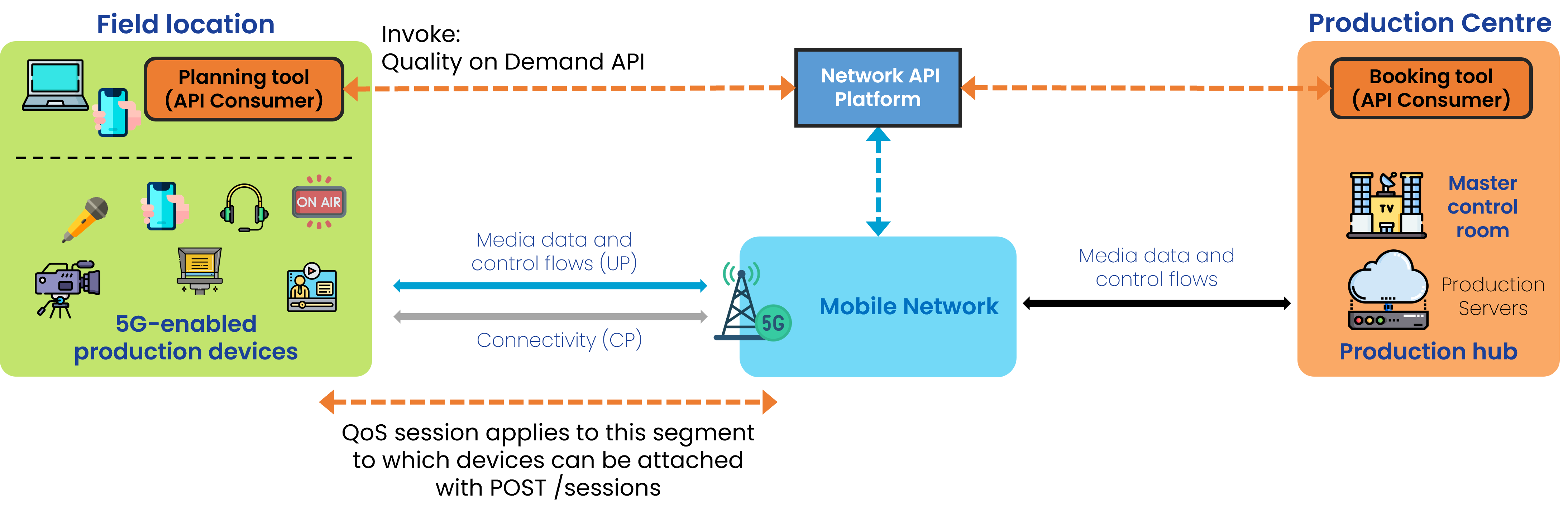
Step 0: Pre-conditions
- The API invoker has signed up with the API provider (CAMARA QualityOnDemand main@471aa35 quality-on-demand.yaml info.description (Authorization and authentication: flows 'agreed upon during the onboarding process'; QoS profiles agreed 'during the onboarding with the API provider')).
- A
qosProfilename has been obtained via the QoS Profiles API or agreed at onboarding. Unlike QoS Booking, there is no pre-booking phase; the session is created directly during operation.
Step 1: Create the session
- POST /sessions passing the
device,applicationServer, ports, the chosenqosProfileand aduration. The response returns asessionIdused to query, extend or delete the session (CAMARA QualityOnDemand main@471aa35 quality-on-demand.yaml/sessionsPOST; schemas SessionInfo.sessionId; path parameter sessionId).
5G-MAG's Self-Assessment
This section records 5G-MAG's practical reading of the API and the open points it raises for media use.
- QoD is the most direct of the QoS APIs for a live media flow: it is invoked at the moment the boost is needed and runs for a bounded
duration, which can be extended withPOST /sessions/{sessionId}/extend. - Because there is no reservation phase, availability is only established when the session is requested (it may stay
REQUESTEDuntil the network confirms or refuses); for a scheduled event where capacity must be guaranteed in advance, QoS Booking may be more appropriate. - The
sink/notification mechanism (see Event notifications) lets the application react when the network can no longer sustain the requested QoS (CAMARA QualityOnDemand main@471aa35 quality-on-demand.yaml/sessionsPOST description; schemas EventQosStatusChanged).
Quality-On-Demand (QoD) API Usage
Request the creation of a session
With POST /sessions, to manage latency/throughput priorities. The request specifies the device, the application server and ports, the chosen QoS profile, a sink for notifications and a duration (CAMARA QualityOnDemand main@471aa35 quality-on-demand.yaml /sessions POST; schemas CreateSession, BaseSessionInfo):
{
  "device": {
    "phoneNumber": "+123456789",
    "networkAccessIdentifier": "123456789@domain.com",
    "ipv4Address": {
      "publicAddress": "203.0.113.0",
      "publicPort": 59765
    },
    "ipv6Address": "2001:db8:85a3:8d3:1319:8a2e:370:7344"
  },
  "applicationServer": {
    "ipv4Address": "198.51.100.0/24",
    "ipv6Address": "2001:db8:85a3:8d3:1319:8a2e:370:7344"
  },
  "devicePorts": {
    "ranges": [
      {
        "from": 5010,
        "to": 5020
      }
    ],
    "ports": [5060, 5070]
  },
  "applicationServerPorts": {
    "ranges": [
      {
        "from": 5010,
        "to": 5020
      }
    ],
    "ports": [5060, 5070]
  },
  "qosProfile": "voice",
  "sink": "https://endpoint.example.com/sink",
  "sinkCredential": {
    "credentialType": "PLAIN"
  },
  "duration": 3600
}
Type of response: Information about the status of the request, including the assigned sessionId and the initial qosStatus (CAMARA QualityOnDemand main@471aa35 quality-on-demand.yaml schemas SessionInfo; /sessions POST description):
{
  "applicationServer": {
    "ipv4Address": "198.51.100.0/24"
  },
  "qosProfile": "QOS_L",
  "sink": "https://application-server.com/notifications",
  "sessionId": "3fa85f64-5717-4562-b3fc-2c963f66afa6",
  "duration": 3600,
  "qosStatus": "REQUESTED"
}
Request QoS session information for a device
With POST /retrieve-sessions and device object. The request identifies the device whose sessions are queried (CAMARA QualityOnDemand main@471aa35 quality-on-demand.yaml /retrieve-sessions POST; schemas RetrieveSessionsInput):
{
  "device": {
    "phoneNumber": "+123456789",
    "networkAccessIdentifier": "123456789@domain.com",
    "ipv4Address": {
      "publicAddress": "203.0.113.0",
      "publicPort": 59765
    },
    "ipv6Address": "2001:db8:85a3:8d3:1319:8a2e:370:7344"
  }
}
Type of response: QoS sessions information, returned as an array (a device may have more than one session) (CAMARA QualityOnDemand main@471aa35 quality-on-demand.yaml /retrieve-sessions POST 200 description; schemas RetrieveSessionsOutput):
[
  {
    "applicationServer": {
      "ipv4Address": "0.0.0.0/0"
    },
    "qosProfile": "QOS_L",
    "sink": "https://application-server.com/notifications",
    "sessionId": "3fa85f64-5717-4562-b3fc-2c963f66afa6",
    "duration": 3600,
    "startedAt": "2024-06-01T12:00:00Z",
    "expiresAt": "2024-06-01T13:00:00Z",
    "qosStatus": "AVAILABLE"
  }
]
Request duration extension of an active QoS session
With POST /sessions/{sessionId}/extend and the requested additional duration (in seconds) (CAMARA QualityOnDemand main@471aa35 quality-on-demand.yaml schemas ExtendSessionDuration.requestedAdditionalDuration; /sessions/{sessionId}/extend POST):
{
  "requestedAdditionalDuration": 1800
}
Obtain QoS session information
With GET /sessions/{sessionId}. The response returns the full current state of the session (CAMARA QualityOnDemand main@471aa35 quality-on-demand.yaml /sessions/{sessionId} GET 200; schemas SessionInfo):
{
  "duration": 3600,
  "device": {
    "ipv4Address": {
      "publicAddress": "203.0.113.0",
      "publicPort": 59765
    }
  },
  "applicationServer": {
    "ipv4Address": "198.51.100.0/24"
  },
  "qosProfile": "QOS_L",
  "sink": "https://application-server.com/notifications",
  "sessionId": "3fa85f64-5717-4562-b3fc-2c963f66afa6",
  "startedAt": "2024-06-01T12:00:00Z",
  "expiresAt": "2024-06-01T13:00:00Z",
  "qosStatus": "AVAILABLE"
}
Event notifications
The QoD API can notify the API consumer asynchronously when the status of a session changes (for example, when prioritised resources become available, expire, or are terminated by the network). This avoids the need to poll GET /sessions/{sessionId} (CAMARA QualityOnDemand main@471aa35 quality-on-demand.yaml /sessions POST description; /sessions/{sessionId} DELETE description; schemas StatusInfo).
Mechanism
Notifications are delivered to the callback URL supplied as the sink parameter when the session is created with POST /sessions (see the request example above). Where present, sinkCredential describes the credential the API provider uses to authenticate against that endpoint. The consumer's sink must accept HTTP POST requests carrying the notification payload (CAMARA QualityOnDemand main@471aa35 quality-on-demand.yaml /sessions POST callbacks notifications {$request.body#/sink}; schemas BaseSessionInfo.sink, sinkCredential; CAMARA Commonalities main@b1a9f08 CAMARA-API-Event-Subscription-and-Notification-Guide.md section 2.1).
The payload follows the CloudEvents 1.0 specification (JSON format) (CAMARA Commonalities main@b1a9f08 CAMARA-API-Event-Subscription-and-Notification-Guide.md section 3.1).
Event types
The Quality on Demand API defines a single notification event type (CAMARA QualityOnDemand main@471aa35 quality-on-demand.yaml schemas QosEventType; /sessions POST callbacks):
| Event type | Meaning |
|---|---|
org.camaraproject.quality-on-demand.v1.qos-status-changed | The QoS status of the session changed. (CAMARA QualityOnDemand main@471aa35 quality-on-demand.yaml schemas QosEventType, EventQosStatusChanged) |
The change itself is conveyed in the data object (CAMARA QualityOnDemand main@471aa35 quality-on-demand.yaml schemas EventQosStatusChanged.data):
| Parameter | Description |
|---|---|
qosStatus | Indicates the new status. In notifications the value is AVAILABLE or UNAVAILABLE. (CAMARA QualityOnDemand main@471aa35 quality-on-demand.yaml schemas EventQosStatus) |
statusInfo | Is included when qosStatus is UNAVAILABLE and gives the reason. Documented values are DURATION_EXPIRED, NETWORK_TERMINATED and DELETE_REQUESTED. (CAMARA QualityOnDemand main@471aa35 quality-on-demand.yaml schemas StatusInfo (DURATION_EXPIRED, NETWORK_TERMINATED, DELETE_REQUESTED; 'only applicable when qosStatus is UNAVAILABLE')) |
Example notification payload
A CloudEvent sent to the sink when a session becomes unavailable because its duration expired (CAMARA QualityOnDemand main@471aa35 quality-on-demand.yaml components/examples QOS_STATUS_CHANGED_EXAMPLE):
{
  "id": "83a0d986-0866-4f38-b8c0-fc65bfcda452",
  "source": "https://api.example.com/qod/v1/sessions/3fa85f64-5717-4562-b3fc-2c963f66afa6",
  "specversion": "1.0",
  "type": "org.camaraproject.quality-on-demand.v1.qos-status-changed",
  "time": "2024-06-01T13:00:00Z",
  "data": {
    "sessionId": "3fa85f64-5717-4562-b3fc-2c963f66afa6",
    "qosStatus": "UNAVAILABLE",
    "statusInfo": "DURATION_EXPIRED"
  }
}
Event type and enum values above are taken from the CAMARA Quality on Demand API definition. Confirm the exact values against the quality-on-demand.yaml for the API version you are integrating against, as they can change between releases (CAMARA QualityOnDemand main@471aa35 quality-on-demand.yaml info.version; schemas QosEventType, StatusInfo).