This documentation is currently under development and subject to change. It reflects outcomes elaborated by 5G-MAG members. If you are interested in becoming a member of the 5G-MAG and actively participating in shaping this work, please contact the Project Office
Description
Developers use the "Quality of Service (QoS) Provisioning" API to request the assignment of a given QoS profile to a specific device, indefinitely. This API sets up the configuration in the network so that the requested QoS profile is applied to the specified device whenever it is connected to the network, until the provisioning is deleted (CAMARA QualityOnDemand main@471aa35 qos-provisioning.yaml info.description (indefinite assignment; 'whenever the device is connected to the network, until the assignment is revoked')).
How this compares to the other QoS APIs (all of which use a profile from the QoS Profiles API) (CAMARA QualityOnDemand main@471aa35 quality-on-demand.yaml info.description; CAMARA QualityOnDemand main@471aa35 qos-provisioning.yaml info.description; CAMARA QoSBooking main@4de93f1 qos-booking.yaml info.description):
- QoS Provisioning (this API): persistent. The profile applies to the device every time it connects, until the provisioning is deleted (CAMARA QualityOnDemand main@471aa35 qos-provisioning.yaml info.description;
/qos-assignmentsPOST). - Quality on Demand: per session. The profile applies for a requested
durationonly (CAMARA QualityOnDemand main@471aa35 quality-on-demand.yaml schemas CreateSession.duration). - QoS Booking: reserved in advance. Capacity is booked for a future time and area (CAMARA QoSBooking main@4de93f1 qos-booking.yaml info.description; schemas serviceArea).
Information: QoS Provisioning project page and GitHub repository
The API definitions can be obtained here: QualityOnDemand API_definitions folder
The QoS Provisioning API definition (YAML) is available at: qos-provisioning.yaml
Operations and dependencies
QoS Provisioning API
- POST /qos-assignments with the request body including a
deviceobject andqosProfile, this request will assign a QoS profile to a device. The response includes anassignmentId(CAMARA QualityOnDemand main@471aa35 qos-provisioning.yaml/qos-assignmentsPOST; schemas CreateAssignment, AssignmentInfo).- Dependency: Needs a
qosProfilename, which can be retrieved from the QoS Profiles API or is agreed during onboarding.
- Dependency: Needs a
GET /qos-assignments/{assignmentId}- Querying for details about the QoS profile assignment (CAMARA QualityOnDemand main@471aa35 qos-provisioning.yaml/qos-assignments/{assignmentId}GET)DELETE /qos-assignments/{assignmentId}- Revokes the assignment of a QoS profile to a device performed by a previous assignment operation (CAMARA QualityOnDemand main@471aa35 qos-provisioning.yaml/qos-assignments/{assignmentId}DELETE description).- POST /retrieve-qos-assignment with the request body including the
deviceobject, this request will return information about the QoS profile assignment for the device with anassignmentId(CAMARA QualityOnDemand main@471aa35 qos-provisioning.yaml/retrieve-qos-assignmentPOST; schemas RetrieveAssignmentByDevice, AssignmentInfo).
Standardisation context
QoS Provisioning is defined in the CAMARA QualityOnDemand repository (OpenAPI 3.0.3, Commonalities-conformant). It consumes a named profile from the QoS Profiles API and, when active, maps to the same 5G Core machinery as the rest of the QoS family: the NEF AsSessionWithQoS operation (TS 29.522) driving Npcf_PolicyAuthorization on the PCF (TS 29.514).
The distinguishing property is persistence. Where Quality on Demand applies a profile for a bounded session duration, QoS Provisioning creates an assignment (POST /qos-assignments) that applies the profile to the device every time it connects, until the assignment is deleted (DELETE /qos-assignments/{assignmentId}). GET /qos-assignments/{assignmentId} reads the assignment and POST /retrieve-qos-assignment looks it up by device. The returned status is REQUESTED (still being processed), AVAILABLE (assigned and active) or UNAVAILABLE (processed but not active).
Comparison within the QoS family
| API | Duration | Bound to | Typical media use |
|---|---|---|---|
| QoS Provisioning (this API) | Persistent, until deleted | A specific device | A fixed contribution device that should always get its profile. (CAMARA QualityOnDemand main@471aa35 qos-provisioning.yaml info.description; /qos-assignments POST) |
| Quality on Demand | One session (duration) | A device flow | A boost for the length of a live feed. (CAMARA QualityOnDemand main@471aa35 quality-on-demand.yaml schemas CreateSession.duration; info.description) |
| QoS Booking | A future window | A specific device | Capacity secured ahead of a scheduled event. (CAMARA QoSBooking main@4de93f1 qos-booking.yaml info.description; /device-qos-bookings POST) |
| QoS Booking and Assignment | A future window | A device count, assigned later | An event where devices are only known on the day. (CAMARA QoSBooking main@4de93f1 qos-booking-and-assignment.yaml info.description; schemas bookingDeviceCount; info.description) |
A practical limitation for media, recorded in the Self-Assessment below, is that the assignment cannot be re-pointed to a different device: replacing a device means deleting the assignment and creating a new one, with no guarantee the new assignment succeeds. There is also no service-area dimension (CAMARA QualityOnDemand main@471aa35 qos-provisioning.yaml paths; schemas CreateAssignment; /qos-assignments POST description (201 may carry UNAVAILABLE).
Workflow: Media application using the QoS Provisioning API to assign a QoS profile to a device
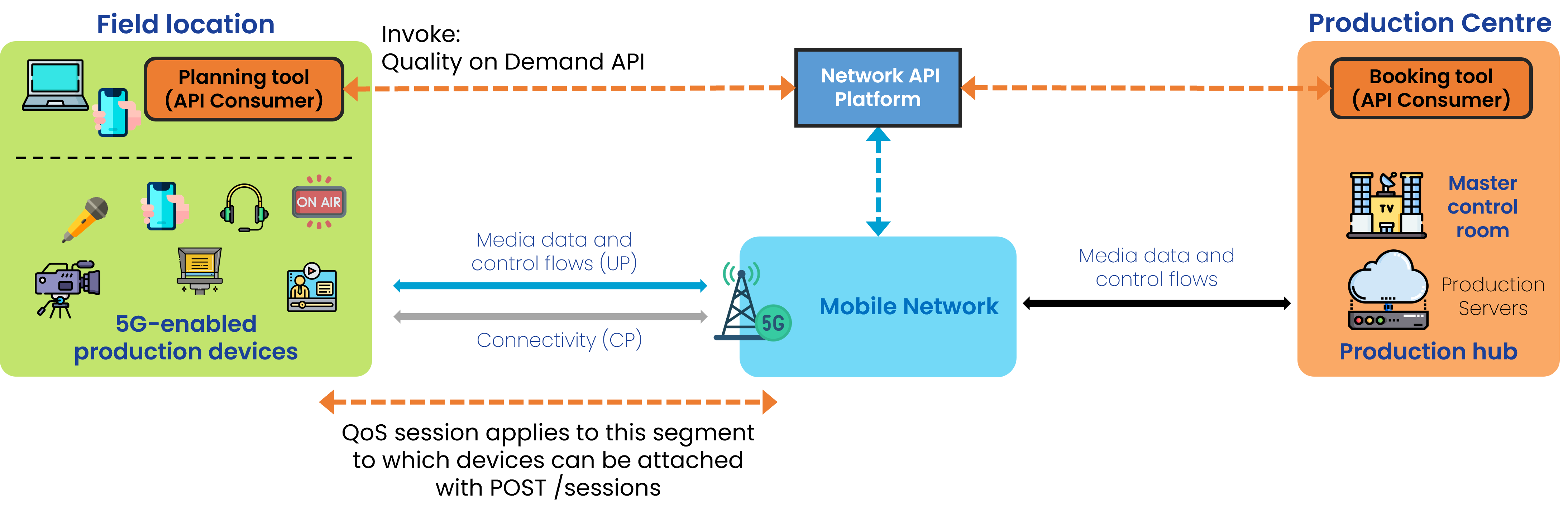
A user of a media application would like to request the assignment of a QoS Profile to a device. An example figure is shown using the QoS Provisioning in the context of Quality on Demand. The following steps are executed:
Step 0: Pre-conditions
- The API invoker needs to have signed up with the API provider (CAMARA QualityOnDemand main@471aa35 qos-provisioning.yaml info.description).
- qosProfiles have already been defined and made available by the network operator (CAMARA QoSProfiles main@8ce8f4d qos-profiles.yaml info.description; CAMARA QualityOnDemand main@471aa35 qos-provisioning.yaml info.description).
- Names of such qosProfiles have been disclosed to the user so they can be used when invoking APIs (CAMARA QualityOnDemand main@471aa35 qos-provisioning.yaml info.description).
Step 1: Check details of an existing QoS Profile (when not cached)
GET /qos-profiles/{name}to obtain the parameters of the QoS Profile (CAMARA QoSProfiles main@8ce8f4d qos-profiles.yaml/qos-profiles/{name}GET)
Step 2: Attach a device to the QoS Profile
- POST /qos-assignments passing the
deviceobject and the name of theqosProfile(CAMARA QualityOnDemand main@471aa35 qos-provisioning.yaml/qos-assignmentsPOST; schemas CreateAssignment) - The received "assignmentId" could be used to query details or revoke the assignment (CAMARA QualityOnDemand main@471aa35 qos-provisioning.yaml parameters assignmentId; schemas AssignmentInfo.assignmentId;
/qos-assignments/{assignmentId}GET, DELETE) - This QoS profile will be assigned to the device anytime it is connected to the network (CAMARA QualityOnDemand main@471aa35 qos-provisioning.yaml info.description).
5G-MAG's Self-Assessment
This section records 5G-MAG's practical reading of the API and the open points it raises for media use.
This API would allow attaching a QoS Profile to a device any time it is connected to the network (CAMARA QualityOnDemand main@471aa35 qos-provisioning.yaml info.description). There is an issue as it is not possible to assign a different device to the existing QoS assignment. If a device would need to be replaced during operation, the existing QoS assignment would have to be deleted and a new assignment created. While doing so there is no guarantee that such new assignment is possible.
Potential improvements:
- Ability to update the device to which the QoS Profile applies.
- There is no information about the location or service area (CAMARA QualityOnDemand main@471aa35 qos-provisioning.yaml schemas CreateAssignment, AssignmentInfo).
- Understanding opportunities in terms of duration and location/area would be useful as the user may be able to move and find a better coverage spot rather than being denied the establishment of QoS at the time and location in which it is requested.
Quality-on-Demand (QoD) Provisioning API Usage
Obtaining the QoS assignment for a device
With POST /retrieve-qos-assignment, and device object. The request identifies the device whose assignment is queried (CAMARA QualityOnDemand main@471aa35 qos-provisioning.yaml /retrieve-qos-assignment POST; schemas RetrieveAssignmentByDevice):
{
  "device": {
    "phoneNumber": "+123456789",
    "networkAccessIdentifier": "123456789@domain.com",
    "ipv4Address": {
      "publicAddress": "203.0.113.0",
      "publicPort": 59765
    },
    "ipv6Address": "2001:db8:85a3:8d3:1319:8a2e:370:7344"
  }
}
Type of response: the assignment details, including the assigned qosProfile, the assignmentId (used to query or revoke it) and its current status (CAMARA QualityOnDemand main@471aa35 qos-provisioning.yaml schemas AssignmentInfo):
{
  "device": {
    "phoneNumber": "+123456789"
  },
  "qosProfile": "QOS_L",
  "sink": "https://application-server.com/callback",
  "sinkCredential": {
    "credentialType": "ACCESSTOKEN",
    "accessToken": "eyJhbGciOiJIUzI1NiIsInR5cCI6IkpXVCJ9.eyJzdWIiOiIxMjM0NTY3ODkwIiwibmFtZSI6IkpvaG4gRG9lIiwiaWF0IjoxNTE2MjM5MDIyfQ.SflKxwRJSMeKKF2QT4fwpMeJf36POk6yJV_adQssw5c",
    "accessTokenExpiresUtc": "2024-12-01T12:00:00Z",
    "accessTokenType": "bearer"
  },
  "assignmentId": "3fa85f64-5717-4562-b3fc-2c963f66afa6",
  "startedAt": "2024-05-12T17:32:01Z",
  "status": "AVAILABLE"
}