This documentation is currently under development and subject to change. It reflects outcomes elaborated by 5G-MAG members. If you are interested in becoming a member of the 5G-MAG and actively participating in shaping this work, please contact the Project Office
Description
With the "Connectivity Insights" API, developers gain visibility into network quality: they can check whether their application's network requirements can be met for a given user session. Based on the API's response, developers can make informed decisions, such as requesting a network boost through the CAMARA Quality on Demand API or adjusting application settings (e.g., video resolution) to ensure the best possible user experience (CAMARA ConnectivityInsights main@db9c0de connectivity-insights.yaml info.description Introduction).
This API performs a single, on-demand ("one-shot") check. For continuous monitoring that pushes an event notification whenever network quality changes, see the companion Connectivity Insights Subscriptions API (CAMARA ConnectivityInsights main@db9c0de connectivity-insights.yaml info.description API functionality; CAMARA ConnectivityInsights main@db9c0de connectivity-insights-subscriptions.yaml /subscriptions POST callbacks notifications).
Information: Connectivity Insights project page and GitHub repository
The API definitions can be obtained here: ConnectivityInsights API_definitions folder
The Connectivity Insights API definition (YAML) is available at: connectivity-insights.yaml
Operations and dependencies
Connectivity Insights API
- POST /check-network-quality with the request body containing an
applicationProfileId, anapplicationServer(IPv4 and/or IPv6 address) and, optionally,applicationServerPorts,device(required with a two-legged access token) andmonitoringTimeStamp- Check the network quality. Response shows the network's current level of confidence (qualitative) that it can meet an application profile's quality thresholds (according to those defined in theapplicationProfileId) for a given end user device.- Dependency: Requires
applicationProfileIdfrom a previous call to the Application Profiles API (CAMARA ConnectivityInsights main@db9c0de connectivity-insights.yaml NetworkQualityInsightRequest required applicationProfileId; info.description step 1;/check-network-qualityPOST 404).
- Dependency: Requires
Standardisation context
Connectivity Insights is a CAMARA sandbox/incubating API (OpenAPI 3.0.3, Commonalities-conformant). It is a read-only, request/response API: it does not change any network state and does not create a QoS session. Where a QoS request maps to the NEF AsSessionWithQoS operation (TS 29.522), Connectivity Insights instead draws on the network's monitoring and analytics capabilities. Inside a 5G Core these are exposed as NEF monitoring events and, for predictive or aggregated signals, the Network Data Analytics Function (NWDAF). CAMARA does not require any particular source; an operator may satisfy the check from live measurements, from analytics, or from a mix.
The design decision most relevant to media is the qualitative response. Each threshold field in the reply carries a string such as "meets the application requirements" rather than a measured value; additionalKPIs adds supporting context (for example signalStrength, connectivityType). This keeps the API operator-agnostic (operators do not have to expose raw core measurements), but it limits how much an application can adapt: it learns that a requirement is not met, but not by how much. 5G-MAG's Self-Assessment records this as a gap for professional media, where a quantitative figure (for example the actual latency on the device-to-application-server path) would allow targeted remedies.
By default the check uses the current date and time; the optional monitoringTimeStamp can carry a future date and time for predictive data. For a scheduled production, a passing check does not guarantee the resource will still be available when the event starts. Where advance assurance is needed, a reservation-style API (QoS Booking or Network Slice Booking) is more appropriate, and where a boost is needed at the moment, Quality on Demand actually requests QoS rather than merely reporting on it. Connectivity Insights is therefore best read as a decision input, not a guarantee (CAMARA ConnectivityInsights main@db9c0de connectivity-insights.yaml NetworkQualityInsightRequest.monitoringTimeStamp; CAMARA QualityOnDemand main@471aa35 quality-on-demand.yaml tags/info; CAMARA QoSBooking main@4de93f1 qos-booking.yaml info.description).
Workflow: Media application requesting Connectivity Insights
A user of a media application would like to obtain Connectivity Insights about the ability of the network to meet the requirements. The following steps are executed:
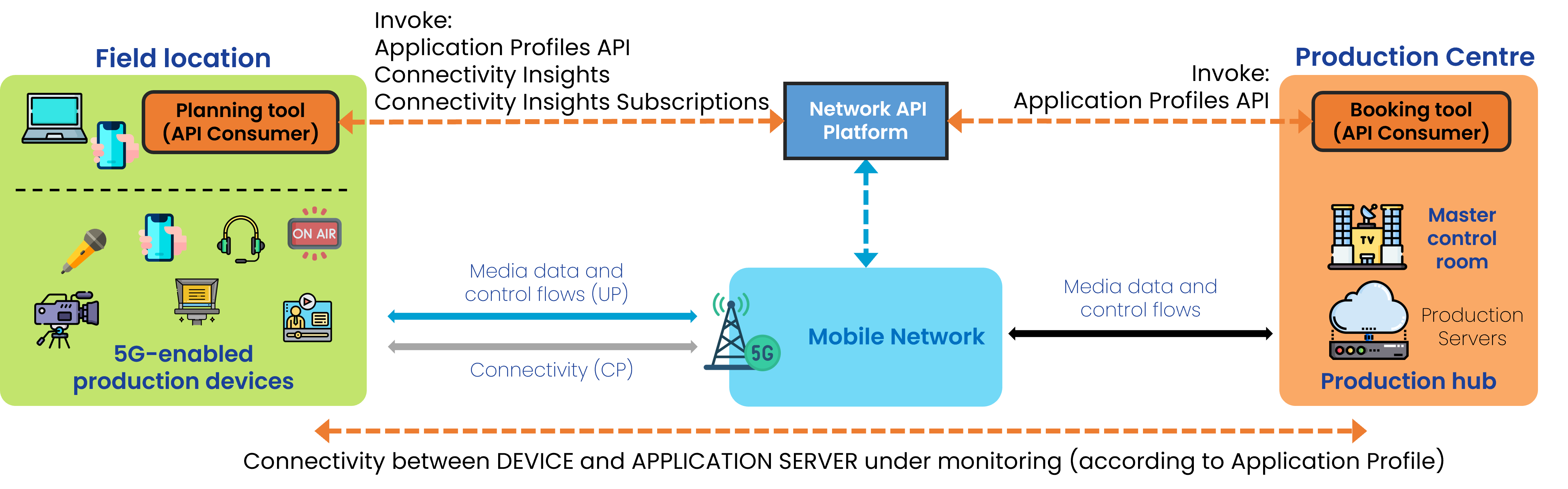
Step 0: Pre-conditions
- Create an application profile using the Application Profiles API (with the relevant application requirements) (CAMARA ConnectivityInsights main@db9c0de connectivity-insights.yaml info.description API functionality usage step 1).
- Create a device object for the device which media flow is to be monitored (CAMARA ConnectivityInsights main@db9c0de connectivity-insights.yaml NetworkQualityInsightRequest.device; info.description identifying the device from the access token).
- Obtain IP address and port of the application server (Ingest Server of Production).
Step 1: Obtain one-shot information on network quality
- POST /check-network-quality, passing the applicationProfileId obtained in step 0, the address/port of an application server, and a device object (CAMARA ConnectivityInsights main@db9c0de connectivity-insights.yaml info.description usage step 2; NetworkQualityInsightRequest).
5G-MAG's Self-Assessment
This section records 5G-MAG's practical reading of the API and the open points it raises for media use.
The APIs are likely to be invoked to obtain information about the ability of the network to meet the requirements either before or during operation. However:
- By default the information received reflects the current date and time. The optional
monitoringTimeStampcan request predictive data for a future time, but the response carries no indication of how reliable that prediction is for the actual time in which the network should be used (CAMARA ConnectivityInsights main@db9c0de connectivity-insights.yaml NetworkQualityInsightRequest.monitoringTimeStamp; NetworkQualityInsightResponse). - The information received is qualitative (e.g.
"targetMinDownstreamRate": "meets the application requirements"). An application would be unable to understand which parameters to be adapted in order to revert a situation in which requirements cannot be met.
Potential improvements:
- If used to monitor resources for which QoS was requested (via a different API) harmonisation of Application Profile and QoS Profile for consistency.
- an indication of the actual performance parameters (quantitative) for those defined in the Application Profile may provide better insight for potential remedies. E.g. latency cannot be fulfilled, but please respond with the actual latency the link device-AS is experiencing.
Application Profiles API Usage
Check: Application Profiles API. The type of parameters that an applicationProfile defines is shown below (CAMARA ApplicationProfiles main@11066d6 application-profiles.yaml ApplicationProfile; NetworkQualityThresholds; ComputeResourcesThresholds).
{
  "networkQualityThresholds": {
    "packetDelayBudget": {
      "value": 12,
      "unit": "Milliseconds"
    },
    "targetMinDownstreamRate": {
      "value": 10,
      "unit": "Mbps"
    },
    "targetMinUpstreamRate": {
      "value": 10,
      "unit": "Mbps"
    },
    "packetLossErrorRate": 3,
    "jitter": {
      "value": 12,
      "unit": "Milliseconds"
    }
  },
  "computeResources": {
    "targetMinCPU": 0.5,
    "targetMinMemory": {
      "value": 10,
      "unit": "MB"
    },
    "gpuVendorType": "Nvidia",
    "gpuModelName": "string",
    "targetMinGPU": 1,
    "targetMinGPUMemory": {
      "value": 10,
      "unit": "MB"
    },
    "targetMinEphemeralStorage": {
      "value": 10,
      "unit": "MB"
    },
    "targetMinPersistentStorage": {
      "value": 10,
      "unit": "MB"
    }
  }
}
Device object
This is how a device is defined (CAMARA QualityOnDemand main@471aa35 quality-on-demand.yaml examples; CAMARA Commonalities main@b1a9f08 Glossary.md Phone Number):
{
  "device": {
    "phoneNumber": "+123456789",
    "networkAccessIdentifier": "123456789@domain.com",
    "ipv4Address": {
      "publicAddress": "84.125.93.10",
      "publicPort": 59765
    },
    "ipv6Address": "2001:db8:85a3:8d3:1319:8a2e:370:7344"
  }
}
Connectivity Insights API Usage
Obtain information about network quality
With POST /check-network-quality passing (CAMARA ConnectivityInsights main@db9c0de connectivity-insights.yaml /check-network-quality POST):
- the ApplicationProfileId, (CAMARA ConnectivityInsights main@db9c0de connectivity-insights.yaml NetworkQualityInsightRequest.applicationProfileId)
- the device object (CAMARA ConnectivityInsights main@db9c0de connectivity-insights.yaml NetworkQualityInsightRequest.device)
- identifier for the application server (IPv4 and/or IPv6 address and ports) (CAMARA ConnectivityInsights main@db9c0de connectivity-insights.yaml NetworkQualityInsightRequest.applicationServer, applicationServerPorts; ApplicationServer)
{
  "applicationProfileId": "3fa85f64-5717-4562-b3fc-2c963f66afa6",
  "device": {
    "phoneNumber": "+123456789",
    "networkAccessIdentifier": "123456789@domain.com",
    "ipv4Address": {
      "publicAddress": "84.125.93.10",
      "publicPort": 59765
    },
    "ipv6Address": "2001:db8:85a3:8d3:1319:8a2e:370:7344"
  },
  "applicationServer": {
    "ipv4Address": "192.168.0.1/24",
    "ipv6Address": "2001:db8:85a3:8d3:1319:8a2e:370:7344"
  },
  "applicationServerPorts": {
    "ranges": [
      {
        "from": 5010,
        "to": 5020
      }
    ],
    "ports": [5060, 5070]
  },
  "monitoringTimeStamp": "2023-07-03T12:27:08.312Z"
}
Type of response: The network's current level of confidence that it can meet an application profile's quality thresholds for a given end user device. Each threshold field carries a qualitative string (for example "meets the application requirements") rather than a measured value; additionalKPIs gives supporting signal information. The exact set of allowed strings is defined in the connectivity-insights.yaml (CAMARA ConnectivityInsights main@db9c0de connectivity-insights.yaml /check-network-quality POST description; NetworkQualityThresholdsConfidence; AdditionalKpis).
{
  "packetDelayBudget": "meets the application requirements",
  "targetMinDownstreamRate": "meets the application requirements",
  "targetMinUpstreamRate": "meets the application requirements",
  "packetlossErrorRate": "meets the application requirements",
  "jitter": "meets the application requirements",
  "additionalKPIs": {
    "signalStrength": "excellent",
    "connectivityType": "5G-SA"
  }
}