This documentation is currently under development and subject to change. It reflects outcomes elaborated by 5G-MAG members. If you are interested in becoming a member of the 5G-MAG and actively participating in shaping this work, please contact the Project Office
Description
Developers use the "Application Profiles" API to share essential information about their applications that is relevant for network and CAMARA APIs decision-making. Currently, it focuses on defining network quality thresholds and compute resource requirements needed by the application. The scope will expand as new requirements from other CAMARA APIs emerge.
Used in the context of (CAMARA ApplicationProfiles main@11066d6 application-profiles.yaml info.description; CAMARA ConnectivityInsights main@db9c0de connectivity-insights.yaml info.description API functionality step 1):
- Connectivity Insights APIs (CAMARA ConnectivityInsights main@db9c0de connectivity-insights.yaml
/check-network-qualityPOST NetworkQualityInsightRequest.applicationProfileId) - Connectivity Insights Subscriptions APIs (CAMARA ConnectivityInsights main@db9c0de connectivity-insights-subscriptions.yaml CreateSubscriptionDetail.applicationProfileId)
This API enables defining, reading, and managing application requirements, including (CAMARA ApplicationProfiles main@11066d6 application-profiles.yaml info.description):
- Network quality thresholds (latency, jitter, loss, throughput) (CAMARA ApplicationProfiles main@11066d6 application-profiles.yaml info.description; tags Application Profiles)
- Compute resource thresholds (CPU, GPU, memory, storage) (CAMARA ApplicationProfiles main@11066d6 application-profiles.yaml info.description; tags Application Profiles)
Information: Application Profiles project page and GitHub repository
The API definitions can be obtained here: ApplicationProfiles API_definitions folder
The Application Profiles API definition (YAML) is available at: application-profiles.yaml
Operations and dependencies
Application Profiles API
- POST /application-profiles with the request body containing user-defined network quality and/or compute resource thresholds. Used to define the thresholds the application requires for an optimal end user experience. Response is the created application profile, including its
applicationProfileId. PATCH /application-profiles/{applicationProfileId}- Replace the complete set of network quality and compute resource thresholds of an application profile with the new set provided in the request bodyGET /application-profiles/{applicationProfileId}- Read an Application Profile (CAMARA ApplicationProfiles main@11066d6 application-profiles.yaml/application-profiles/{applicationProfileId}GET)DELETE /application-profiles/{applicationProfileId}- Delete an application profile (CAMARA ApplicationProfiles main@11066d6 application-profiles.yaml/application-profiles/{applicationProfileId}DELETE)
Parameters
-
Network Quality Thresholds (CAMARA ApplicationProfiles main@11066d6 application-profiles.yaml NetworkQualityThresholds)
packetDelayBudget- the maximum allowable one-way latency between the customer's device and the gateway from the operator's network to other networks. The end-to-end or round trip latency will be about two times this value plus the latency not controlled by the operator (CAMARA ApplicationProfiles main@11066d6 application-profiles.yaml PacketDelayBudget description)targetMinDownstreamRate- the target minimum downstream rate (CAMARA ApplicationProfiles main@11066d6 application-profiles.yaml TargetMinDownstreamRate).targetMinUpstreamRate- the target minimum upstream rate (CAMARA ApplicationProfiles main@11066d6 application-profiles.yaml TargetMinUpstreamRate)packetLossErrorRate- the exponential power of the allowable error loss rate 10^(-N). For 5G networks the 3GPP specification TS 23.501 defines the Packet Error Rate as a 5QI characteristic (TS 23.501 V20.3.0 clause 5.7.3.5); the 4G QCI attribute is defined in TS 23.203.jitter- this requirement aims to limit the maximum variation in round-trip packet delay for the 99th percentile of traffic, following ITU Y.1540 standards. It considers only acknowledged packets in a session, which are packets that receive a confirmation of receipt from the recipient (e.g., using TCP) (CAMARA ApplicationProfiles main@11066d6 application-profiles.yaml Jitter description).
-
Compute Resources (the minimum compute capacity the application needs where it runs). Values are given as a number plus a
unit, except CPU and GPU counts which are plain numbers:targetMinCPU- minimum number of vCPUs (fractional values allowed, e.g. 0.5).targetMinMemory- minimum working memory (value + unit, e.g. MB) (CAMARA ApplicationProfiles main@11066d6 application-profiles.yaml ComputeUnitEnum; Compute; TargetMinMemory).gpuVendorType- required GPU vendor (e.g. Nvidia) (CAMARA ApplicationProfiles main@11066d6 application-profiles.yaml GpuVendorType).gpuModelName- required GPU model name (CAMARA ApplicationProfiles main@11066d6 application-profiles.yaml GpuModelName).targetMinGPU- minimum number of GPUs (CAMARA ApplicationProfiles main@11066d6 application-profiles.yaml TargetMinGpu).targetMinGPUMemory- minimum GPU memory (value + unit) (CAMARA ApplicationProfiles main@11066d6 application-profiles.yaml ComputeResourcesThresholds.targetMinGPUMemory).targetMinEphemeralStorage- minimum short-lived (scratch) storage (value + unit) (CAMARA ApplicationProfiles main@11066d6 application-profiles.yaml TargetMinEphemeralStorage; Compute).targetMinPersistentStorage- minimum persistent storage (value + unit) (CAMARA ApplicationProfiles main@11066d6 application-profiles.yaml TargetMinPersistentStorage; Compute).
The exact accepted units and value ranges are defined in the application-profiles.yaml; confirm against the version you integrate against (CAMARA ApplicationProfiles main@11066d6 application-profiles.yaml RateUnitEnum, ComputeUnitEnum, TimeUnitEnum and schema minimum/maximum values).
Standardisation context
Application Profiles is a CAMARA API defined in OpenAPI 3.0.3 and governed by the CAMARA Commonalities rules (error model, security). It is a data-management API: unlike the QoS APIs it does not, by itself, map to a 3GPP northbound operation on the Network Exposure Function (NEF). Its role is to store a reusable description of an application's requirements so that other APIs (here, Connectivity Insights) can reference it by applicationProfileId instead of repeating the thresholds on every call (CAMARA ApplicationProfiles main@11066d6 application-profiles.yaml info; paths /application-profiles).
The network-quality thresholds follow the parameters used to characterise a 5G QoS flow. packetDelayBudget and packetLossErrorRate correspond to the Packet Delay Budget and Packet Error Rate characteristics that are associated with a 5G QoS Identifier (5QI) (TS 23.501 V20.3.0 clause 5.7.3.4; TS 23.501 V20.3.0 clause 5.7.3.5). The target minimum rates are not 5QI characteristics (flow bit rates are separate QoS parameters). CAMARA keeps these at an application-facing level of abstraction rather than exposing 5QI values directly. The computeResources block has no 3GPP QoS equivalent; it describes compute needs (CPU, GPU, memory, storage) of the application and is out of scope of the QoS mapping.
Because Application Profiles is the shared vocabulary for the Connectivity Insights family, its parameter set overlaps deliberately with the QoS Profiles API. The two are not identical: QoS Profiles adds duration, priority and L4S fields, while Application Profiles adds the compute block. 5G-MAG's Self-Assessment below flags harmonising the two as an open point (CAMARA ApplicationProfiles main@11066d6 application-profiles.yaml NetworkQualityThresholds, ComputeResourcesThresholds; CAMARA QoSProfiles main@8ce8f4d qos-profiles.yaml QosProfile minDuration, maxDuration, priority, l4sQueueType).
Resource lifecycle
The four operations form a simple CRUD lifecycle on the applicationProfileId resource (CAMARA ApplicationProfiles main@11066d6 application-profiles.yaml paths /application-profiles POST, /application-profiles/{applicationProfileId} PATCH, GET, DELETE):
| Step | Operation | Effect |
|---|---|---|
| Create | POST /application-profiles | Stores the thresholds and returns a new applicationProfileId. (CAMARA ApplicationProfiles main@11066d6 application-profiles.yaml /application-profiles POST response 201 ApplicationProfile) |
| Read | GET /application-profiles/{applicationProfileId} | Returns the stored profile. (CAMARA ApplicationProfiles main@11066d6 application-profiles.yaml /application-profiles/{applicationProfileId} GET response 200) |
| Update | PATCH /application-profiles/{applicationProfileId} | Replaces the threshold set (note the description says the complete set is replaced). (CAMARA ApplicationProfiles main@11066d6 application-profiles.yaml /application-profiles/{applicationProfileId} PATCH description) |
| Delete | DELETE /application-profiles/{applicationProfileId} | Deletes the application profile. |
There is no notification mechanism on this API: a profile is inert data, and it only has an effect when another API is invoked with its id (CAMARA ApplicationProfiles main@11066d6 application-profiles.yaml paths).
Workflow for a media application creating an Application Profile
A user of a media application would like to create an Application Profile with the network quality thresholds for the application. The following step creates the profile.
The figure below places Application Profiles in the wider Connectivity Insights flow, so it shows more than the single creation step described here (the Application Profile is the first block; the later blocks belong to Connectivity Insights).
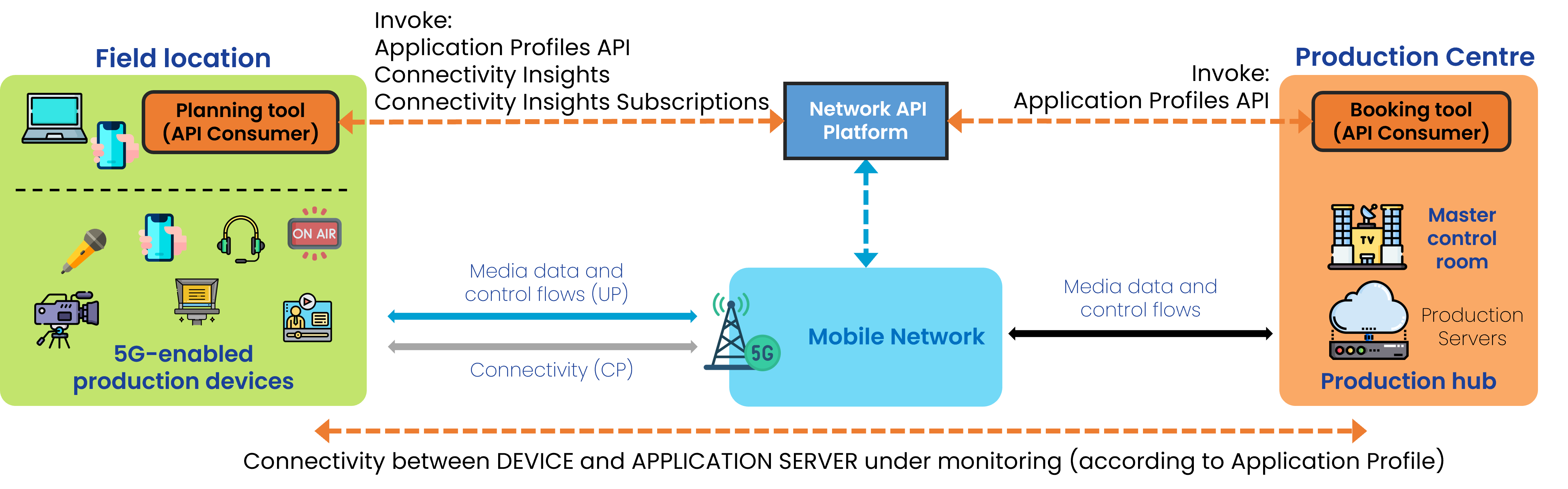
Step 1: Creation of Application Profile
- Create an application profile using the Application Profiles API with POST /application-profiles and with the request body containing user-defined network quality thresholds (CAMARA ApplicationProfiles main@11066d6 application-profiles.yaml
/application-profilesPOST).
Further steps
- The
applicationProfileIdreturned here is then passed to the APIs that consume it, namely Connectivity Insights (a one-shot quality check) and Connectivity Insights Subscriptions (continuous monitoring via notifications) (CAMARA ConnectivityInsights main@db9c0de connectivity-insights.yaml/check-network-qualityPOST NetworkQualityInsightRequest.applicationProfileId; CAMARA ConnectivityInsights main@db9c0de connectivity-insights-subscriptions.yaml/subscriptionsPOST CreateSubscriptionDetail.applicationProfileId).
5G-MAG's Self-Assessment
What we understand:
- The API is likely to be invoked well before the actual use of the network with the required values of performance and compute resources.
- The Application Profile appears to be a list of parameters to be monitored on the link between the device and the Application Server (AS, the server endpoint the media flows to or from) once other APIs are invoked passing the Application Profile as body (CAMARA ConnectivityInsights main@db9c0de connectivity-insights.yaml
/check-network-qualityPOST request description; ApplicationServer description). - Once an
applicationProfileIdis obtained, it can be used by other APIs (CAMARA ConnectivityInsights main@db9c0de connectivity-insights.yaml NetworkQualityInsightRequest.applicationProfileId; CAMARA ConnectivityInsights main@db9c0de connectivity-insights-subscriptions.yaml CreateSubscriptionDetail.applicationProfileId).
Open questions and potential improvements:
- The list of parameters and their units/accuracy should be checked for typical media applications. The parameters are a subset of
qosProfilewith additional compute resources. Harmonise? - Is the packet delay budget defined between device and cloud server, or to the User Plane Function (UPF)? When invoking Connectivity Insights with such a profile and an indicated device and AS, how would this relate?
Application Profiles API Usage
Create a profile which represent the network demands of an application
With POST /application-profiles (CAMARA ApplicationProfiles main@11066d6 application-profiles.yaml /application-profiles POST)
The request body below declares the network quality thresholds and compute resources the application needs (CAMARA ApplicationProfiles main@11066d6 application-profiles.yaml ApplicationProfileRequest):
{
  "networkQualityThresholds": {
    "packetDelayBudget": {
      "value": 12,
      "unit": "Milliseconds"
    },
    "targetMinDownstreamRate": {
      "value": 10,
      "unit": "Mbps"
    },
    "targetMinUpstreamRate": {
      "value": 10,
      "unit": "Mbps"
    },
    "packetLossErrorRate": 3,
    "jitter": {
      "value": 12,
      "unit": "Milliseconds"
    }
  },
  "computeResources": {
    "targetMinCPU": 0.5,
    "targetMinMemory": {
      "value": 10,
      "unit": "MB"
    },
    "gpuVendorType": "Nvidia",
    "gpuModelName": "string",
    "targetMinGPU": 1,
    "targetMinGPUMemory": {
      "value": 10,
      "unit": "MB"
    },
    "targetMinEphemeralStorage": {
      "value": 10,
      "unit": "MB"
    },
    "targetMinPersistentStorage": {
      "value": 10,
      "unit": "MB"
    }
  }
}
Type of response: An applicationProfileId. The response echoes back the stored thresholds together with the new identifier to reference in later calls (CAMARA ApplicationProfiles main@11066d6 application-profiles.yaml /application-profiles POST response 201 ApplicationProfile):
{
  "applicationProfileId": "3fa85f64-5717-4562-b3fc-2c963f66afa6",
  "networkQualityThresholds": {
    "packetDelayBudget": {
      "value": 12,
      "unit": "Milliseconds"
    },
    "targetMinDownstreamRate": {
      "value": 10,
      "unit": "Mbps"
    },
    "targetMinUpstreamRate": {
      "value": 10,
      "unit": "Mbps"
    },
    "packetLossErrorRate": 3,
    "jitter": {
      "value": 12,
      "unit": "Milliseconds"
    }
  }
}