This documentation is currently under development and subject to change. It reflects outcomes elaborated by 5G-MAG members. If you are interested in becoming a member of the 5G-MAG and actively participating in shaping this work, please contact the Project Office
Using CAMARA APIs: Dedicated Networks for Content Production & Contribution
Find more information about Dedicated Networks API.
Purpose
A user of a media application requests from the mobile network a set of capabilities and connectivity performance targets for a particular geographical location and time window.
Workflow and Architecture
The entities, devices and interaction within the scope of this API are illustrated in the high-level figure below.
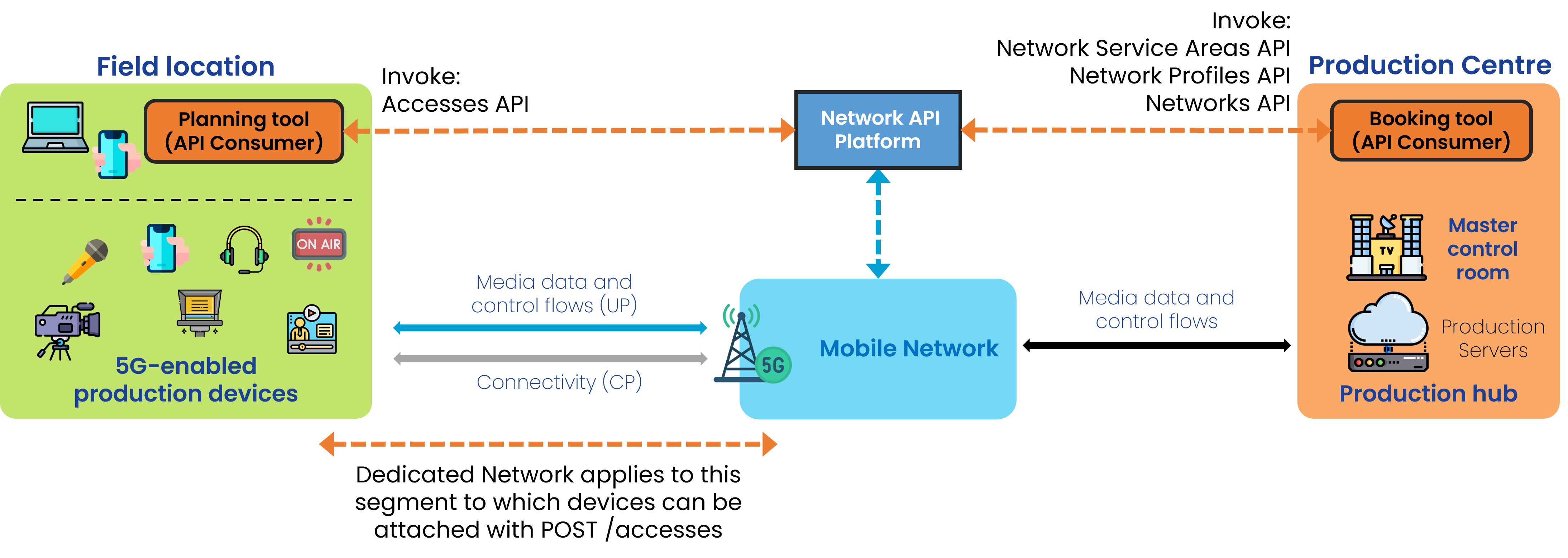
General Workflow
The lifecycle of a Dedicated Network, from the preconditions that must be met before a request can be made, all the way through to establishing the Dedicated Network itself, its use, and then the dismantling of the service is shown below.
In the procedure flow below, each step is tagged with the actor that performs it: ASP (Application Service Provider, the media application side that invokes the API) or CSP (Communication Service Provider, the network operator side that fulfils the request). Coloured bands group the steps into the phases Pre-conditions, Before using the network, During operation, and Dismantling.
On-boarding of the ASP and Negotiation
- Sign up and access credentials
- Selection / Request for Network Profiles and Network Service Areas
Step 0: Pre-conditions
- The user (API invoker) must have registered (signed up) with the API provider.
- qosProfiles have already been defined and made available by the network operator. This is related to the QoS Profiles API.
- Dedicated Network Service Areas are created by the operator and made available. Each area is associated with one or more Network Profiles.
- Network Profiles set out the maximum number of devices that can be concurrently served within the area, as well as the aggregate UL and DL throughput that the network operator can offer.
Step 1: Before using the network
1.0a. Discovery of available and eligible Network Profiles
GET /profiles to obtain a list of dedicated network profiles with the corresponding "id": "string".
The response below shows one network profile: note the id (used in later calls), the device cap (maxNumberOfDevices), the aggregate uplink/downlink throughput, and the QoS profiles it bundles.
[
  {
    "id": "string",
    "maxNumberOfDevices": 0,
    "aggregatedUlThroughput": {
      "value": 10,
      "unit": "bps"
    },
    "aggregatedDlThroughput": {
      "value": 10,
      "unit": "bps"
    },
    "qosProfiles": ["QCI_1_voice"],
    "defaultQosProfile": "QCI_1_voice"
  }
]
GET /qos-profiles/{name}, using the QoS Profiles API, to obtain details of the already arranged QoS Profile.
An example of the QoS Profile, including status:
// Example values: replace with actual network requirements
[
  {
    "name": "voice",
    "description": "QoS profile for voice calls",
    "status": "ACTIVE",
    "targetMinUpstreamRate": {
      "value": 128,
      "unit": "Kbps"
    },
    "maxUpstreamRate": {
      "value": 128,
      "unit": "Kbps"
    },
    "maxUpstreamBurstRate": {
      "value": 128,
      "unit": "Kbps"
    },
    "targetMinDownstreamRate": {
      "value": 128,
      "unit": "Kbps"
    },
    "maxDownstreamRate": {
      "value": 128,
      "unit": "Kbps"
    },
    "maxDownstreamBurstRate": {
      "value": 128,
      "unit": "Kbps"
    },
    "minDuration": {
      "value": 60,
      "unit": "Seconds"
    },
    "maxDuration": {
      "value": 60,
      "unit": "Seconds"
    },
    "priority": 20,
    "packetDelayBudget": {
      "value": 100,
      "unit": "Milliseconds"
    },
    "jitter": {
      "value": 30,
      "unit": "Milliseconds"
    },
    "packetErrorLossRate": 3,
    "l4sQueueType": "non-l4s-queue",
    "serviceClass": "real_time_interactive"
  }
]
1.0b. Discovery of available and eligible Network Service Areas
The ASP should create an object with the desired location by means of one of the following parameters:
{
  "atLocation": {
    "latitude": 50.735851,
    "longitude": 7.10066
  },
  "overlappingArea": {},
  "coveringArea": {},
  "byName": "string",
  "byNetworkProfileId": "string",
  "byQosProfileName": "QCI_1_voice"
}
POST /retrieve-service-areas passing this object as body.
This operation should return an "id": "string", in this form:
[
  {
    "id": "3fa85f64-5717-4562-b3fc-2c963f66afa6",
    "name": "string",
    "description": "string",
    "area": {},
    "networkProfiles": ["string"],
    "qosProfiles": ["QCI_1_voice"]
  }
]
1.1 Request for Dedicated Network reservation
POST /networks passing a networkProfileId, serviceTime, serviceAreaId, among others, in the following form. Note that networkProfileId here is the id returned by GET /profiles in step 1.0a:
{
  "networkProfileId": "string",
  "serviceTime": {
    "start": "2025-11-05T14:14:35.390Z",
    "end": "2025-11-05T14:14:35.390Z"
  },
  "serviceAreaId": "3fa85f64-5717-4562-b3fc-2c963f66afa6",
  "sink": "https://endpoint.example.com/sink",
  "sinkCredential": {}
}
The response should contain a "status": "REQUESTED".
1.2 Assessment of Dedicated Network reservation and change of status
During this phase, GET /networks may be used to list the information on the dedicated networks and their status.
1.3 Assignment of Device Access to the Dedicated Network
POST /accesses should be used to attach devices to a dedicated network. The body identifies the target network (networkId, the id returned by POST /networks), the device (by phone number, network access identifier or IP address), and the QoS profiles the device may use:
{
  "networkId": "3fa85f64-5717-4562-b3fc-2c963f66afa6",
  "device": {
    "phoneNumber": "+123456789",
    "networkAccessIdentifier": "123456789@domain.com",
    "ipv4Address": {
      "publicAddress": "84.125.93.10",
      "publicPort": 59765
    },
    "ipv6Address": "2001:db8:85a3:8d3:1319:8a2e:370:7344"
  },
  "qosProfiles": ["string"],
  "defaultQosProfile": "string"
}
Step 2: During operation
The step numbers here follow the procedure flow above.
2.1 Request Device Access for the Dedicated Network
Device access requests can also be made during operation, not only in step 1.3, so that devices are attached to the Dedicated Network when they are needed. See step 2.4 for the endpoints used.
2.2 Dedicated Network is active and available
GET /networks may be used to list the information on the dedicated networks and their status; the network is available for use once its status reflects activation.
2.3 Device establishes connection
An assigned device connects to the network and starts using the reserved capabilities of the Dedicated Network.
2.4 Usage of API capabilities
A series of operations to assign new devices and de-assign existing ones can be performed while the Dedicated Network is active via:
POST /accesses with the request body including the networkId received after invoking the Dedicated Network API (id), a device object, qosProfiles, this request will create a device access to a dedicated network with a given configuration. The response includes an id.
DELETE /accesses/{accessId} to delete a device access to the dedicated network.
Step 3: Dismantling
When reaching the duration the Dedicated Network may be torn down. A graceful way of tearing down will delete device accesses and dedicated networks by id.
DELETE /accesses/{accessId} deletes a device access to the dedicated network
DELETE /networks/{networkId} deletes a dedicated network
5G-MAG's Self-Assessment
- The Profiles and Networks APIs are to be invoked before the actual usage of the network to ensure that the requested capabilities are "reserved" for the specific area and time window.
- During the event devices will have access to the Dedicated Network and should be allocated or de-allocated depending on the actual requirements.
- This API is certainly adequate for a simple use case of 1 device requesting connectivity (MoJo) or multiple devices taking part in a Media Production setup.
- One of the most interesting features in this API is the ability to define and create the network profile and later on attach/detach a device. This adds flexibility and avoids losing the dedicated resources when revoking a device.
Potential improvements:
- Possibility to extend/update the Dedicated Network (e.g. extending duration).
Why this API suits multi-device productions
The Dedicated Networks API is the most complete fit for the multi-device production scenario because it separates three concerns that the QoS-session APIs conflate:
- Area discovery (
POST /retrieve-service-areas) is distinct from reservation, so the ASP can find the operator-defined service area covering a venue before committing to a booking. This is the only CAMARA API that offers this separation. - Reservation (
POST /networks) books a Network Profile (a QoS profile plus a device cap and aggregate uplink/downlink throughput) for a service area and time window, independent of any specific device. - Device access (
POST /accesses,DELETE /accesses/{accessId}) attaches and detaches individual devices to the reserved network at any time during operation.
This decoupling is what enables the operational patterns a production needs: attaching cameras only when they come online, swapping in a back-up camera without losing the reservation, and the on-air / preview / standby prioritisation described in the Workflows page (where a Network Profile is booked for the worst-case aggregate throughput, but only a subset of devices holds the high-quality profile at any instant). A single-device MoJo contribution is a degenerate case of the same model, with one Network Profile and one device access.
Relationship to Network Profiles and QoS Profiles
A Network Profile bundles one or more QoS Profiles with a maxNumberOfDevices cap and aggregatedUlThroughput / aggregatedDlThroughput figures. The QoS Profile carries the per-flow targets (throughput, packet delay budget, jitter, packet error loss rate); the Network Profile adds the capacity dimension (how many devices, at what aggregate rate) that a multi-device booking needs. The defaultQosProfile on both the Network Profile and the device access sets the treatment a device receives unless it requests a different eligible profile. For the QoS Profile field semantics see Using CAMARA APIs: QoS Profiles.
How this maps to 3GPP
A Dedicated Network is realised in the 5G Core as reserved connectivity for a set of devices over an area and window. Depending on the operator's implementation this maps to a network slice (identified by an S-NSSAI) and/or a set of QoS Flows provisioned through policy. The reservation and device-access requests drive the Network Exposure Function (NEF) northbound APIs (TS 29.522); advance reservation of a future window uses background data transfer negotiation (Nnef_BDTPNegotiation, TS 29.522; the underlying BDT policies are handled by the PCF, TS 29.554), and per-device QoS is authorised by the Policy Control Function (Npcf_PolicyAuthorization, TS 29.514). Non-public network realisations (a stand-alone NPN, or a PNI-NPN via dedicated DNNs or network slice instances) are defined in TS 23.501 V20.3.0 clause 5.30. See Network API Initiatives.
Related
- Dedicated Networks API: the API reference and CAMARA source.