This documentation is currently under development and subject to change. It reflects outcomes elaborated by 5G-MAG members. If you are interested in becoming a member of the 5G-MAG and actively participating in shaping this work, please contact the Project Office
CAMARA: QoS Profiles API
Description
The "Quality-of-Service (QoS) Profiles" API exposes a set of predefined network performance characteristics, such as latency, throughput, and priority, each identified by a unique name. These profiles let application developers specify the desired network behavior for their application's data traffic, so as to ensure optimal performance. By selecting an appropriate QoS profile, developers can request stable latency (reduced jitter) or throughput for specific data flows between client devices and application servers when used by the Quality On Demand API.
A QoS profile is a named, operator-defined bundle of these characteristics. It is the foundational input for most of the other QoS-related APIs: developers usually consult this API first to learn which profile names an operator offers, then pass a chosen name to Quality on Demand, QoS Provisioning, QoS Booking, or Dedicated Networks.
Used in the context of:
- Dedicated Networks API
- Quality on Demand API
- QoS Provisioning API
- QoS Booking API
- QoS Booking and Assignment API
Information: QoS Profiles project page and GitHub repository
The API definitions can be obtained here: QualityOnDemand API_definitions folder
The QoS Profiles API definition (YAML) is available at: qos-profiles.yaml
Operations and dependencies
QoS Profiles API
- POST /retrieve-qos-profiles with a request body including a
deviceobject,nameof the profile andstatus, it is used to query QoS Profiles for a given device. The response contains information about the QoS Profiles GET /qos-profiles/{name}- get QoS Profile for a given name
Parameters describing a QoS Profile
| Parameter | Description |
|---|---|
packetDelayBudget | the maximum allowable one-way latency between the customer's device and the gateway from the operator's network to other networks. The end-to-end or round trip latency will be about two times this value plus the latency not controlled by the operator |
targetMinDownstreamRate | the target minimum downstream rate. |
targetMinUpstreamRate | the target minimum upstream rate |
packetErrorLossRate | the exponential power of the allowable error loss rate 10^(-N). For 5G network the 3GPP specification TS 23.203 defines the packet error loss rate QCI attribute. |
jitter | this requirement aims to limit the maximum variation in round-trip packet delay for the 99th percentile of traffic, following ITU Y.1540 standards. It considers only acknowledged packets in a session, which are packets that receive a confirmation of receipt from the recipient (e.g., using TCP). |
minDuration | the minimum time a session using this profile can be requested for. |
maxDuration | the maximum time a session using this profile can be requested for. |
priority | the relative precedence of this profile when the network arbitrates between competing flows (lower value means higher priority). |
l4sQueueType | whether the profile uses a Low Latency, Low Loss, Scalable throughput (L4S) queue, an IETF congestion-control scheme designed to keep latency low under load. Example values include non-l4s-queue. |
The response example below also carries fields not listed here (for example maxUpstreamRate, maxDownstreamBurstRate, serviceClass). The authoritative field set and allowed values are defined in the qos-profiles.yaml. The full object also includes countryAvailability (the countries in which the profile is offered). The serviceClass field carries a coarse traffic category (for example real_time_interactive).
Standardisation context
QoS Profiles is defined in the CAMARA QualityOnDemand repository (OpenAPI 3.0.3, Commonalities-conformant) alongside Quality on Demand and QoS Provisioning. It is the catalogue that the whole QoS family reads from: a profile is a named, operator-defined bundle of network characteristics, and the other QoS APIs (Quality on Demand, QoS Provisioning, QoS Booking, QoS Booking and Assignment, and the Dedicated Networks profiles) take a profile name as input. The API is read-only: GET /qos-profiles/{name} returns one profile, and POST /retrieve-qos-profiles returns the profiles applicable to a given device (optionally filtered by name and status).
The profile fields map onto the way QoS is characterised inside a 5G Core. A 5G QoS flow is described by a 5G QoS Identifier (5QI) and its associated QoS characteristics: a resource type (guaranteed or non-guaranteed bit rate), a priority level, a Packet Delay Budget and a Packet Error Rate. The CAMARA fields correspond to these at an application-facing level: packetDelayBudget and packetErrorLossRate to the delay and error characteristics, the targetMin/max upstream and downstream rates to the bit-rate characteristics, and priority to the priority level. In 4G/LTE the equivalent single label is the QoS Class Identifier (QCI), which is why some operator profile names keep a QCI_ prefix. CAMARA exposes named profiles rather than raw 5QI values so that the same name can be honoured across operators whose internal 5QI mappings differ.
Two fields are worth calling out for media:
l4sQueueTypeindicates whether the profile uses a Low Latency, Low Loss, Scalable throughput (L4S) queue. L4S is an IETF congestion-control scheme (RFC 9330 family) designed to keep queuing delay low under load, which is directly relevant to interactive contribution links. Example value:non-l4s-queue.jitteris defined against ITU-T Y.1540 and targets the 99th percentile of round-trip delay variation for acknowledged packets, a tighter definition than a simple average.
Known gaps
The API has no operation to list the available profile names and no operation to define a profile: profiles are created out of band by the operator, and their names must be communicated to the developer separately. There is also no service-area dimension, so a profile's availability at a given place and time is not expressed. 5G-MAG's Self-Assessment below records all three as practical gaps for media workflows.
Workflow: Media application retrieving QoS profiles
A user of a media application would like to retrieve QoS profiles available in the network. An example figure is shown using the QoS Profiles in the context of Quality on Demand. The following steps are executed:
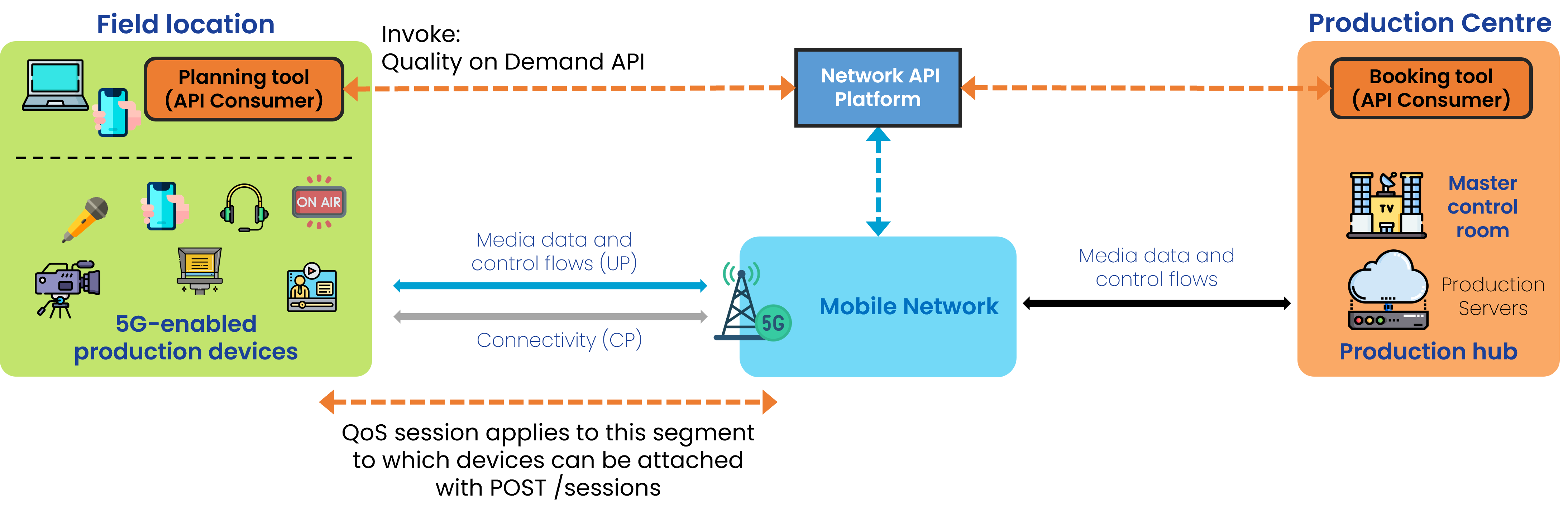
Step 0: Pre-conditions
- The API invoker needs to have signed up with the API provider.
- qosProfiles have already been defined and made available by the network operator. (This API has no operation to define profiles; see the Self-Assessment below, which flags this as a gap.)
- Names of such qosProfiles have been disclosed to the user so they can be used when invoking APIs.
Step 1: Check details of an existing QoS Profile (when not cached)
GET /qos-profiles/{name}to obtain the parameters of the QoS Profile
5G-MAG's Self-Assessment
The QoS Profiles API would be used prior to the start of the event in order to understand the profiles and details of the profiles available in the network. However, it seems that the only way to obtain the list of parameters of a profile is by invoking the API with the QoS Profile name. A method to query the list of available profile names is lacking. There is also no method to define QoS Profiles, and this operation should be done beforehand.
Potential improvements:
- A way to list profile names available in the network
- A solution to the fact that QoS Profiles need to be established manually before being able to invoke them.
- There is no information about the location or service area where such profiles are available. It would be impractical if QoS Profiles would only be retrievable once in the exact location and at a given time.
Quality-of-Service (QoS) Profiles API Usage
Obtain QoS profiles available
With POST /retrieve-qos-profiles, and device parameters. The request scopes the query to a device, optionally by profile name and status:
{
  "device": {
    "phoneNumber": "+123456789",
    "networkAccessIdentifier": "123456789@domain.com",
    "ipv4Address": {
      "publicAddress": "203.0.113.0",
      "publicPort": 59765
    },
    "ipv6Address": "2001:db8:85a3:8d3:1319:8a2e:370:7344"
  },
  "name": "voice",
  "status": "ACTIVE"
}
Type of response: information about the QoS Profiles, returned as an array of profile objects. Each object carries the profile name, description, status and its performance characteristics (rates, delay, jitter, priority, and so on):
// Example values — replace with actual network requirements
[
  {
    "name": "voice",
    "description": "QoS profile for voice calls",
    "status": "ACTIVE",
    "targetMinUpstreamRate": {
      "value": 128,
      "unit": "Kbps"
    },
    "maxUpstreamRate": {
      "value": 128,
      "unit": "Kbps"
    },
    "maxUpstreamBurstRate": {
      "value": 128,
      "unit": "Kbps"
    },
    "targetMinDownstreamRate": {
      "value": 128,
      "unit": "Kbps"
    },
    "maxDownstreamRate": {
      "value": 128,
      "unit": "Kbps"
    },
    "maxDownstreamBurstRate": {
      "value": 128,
      "unit": "Kbps"
    },
    "minDuration": {
      "value": 60,
      "unit": "Seconds"
    },
    "maxDuration": {
      "value": 60,
      "unit": "Seconds"
    },
    "priority": 20,
    "packetDelayBudget": {
      "value": 100,
      "unit": "Milliseconds"
    },
    "jitter": {
      "value": 30,
      "unit": "Milliseconds"
    },
    "packetErrorLossRate": 3,
    "l4sQueueType": "non-l4s-queue",
    "serviceClass": "real_time_interactive"
  }
]