This page contains information such as the specifications within the scope of the tools, high-level architectures that bring context to their applicability, features under implementation,...
Technical documentation providing context to this project can be found in the link below.
Tech: XR: 3D Scenes and Avatar Communications
A list of relevant specifications can be found in the link below.
Standards: XR Media with MPEG-I Scene Description
Specifications and releases covered
The XR reference tools implement the scene-description parts of the XR stack. In scope:
- MPEG-I Scene Description (ISO/IEC 23090-14). The tools implement the standard's runtime model, the Presentation Engine (here, a Unity player), the Media Access Function (MAF) API, and the buffer interface, plus the MPEG glTF 2.0 extensions listed in the tables below. glTF 2.0 is the base format (Khronos glTF 2.0, also published as ISO/IEC 12113); the MPEG extensions add timed and immersive media on top of it.
- glTF extension coverage. The support matrices below show, per extension, what is implemented today in the Unity player and Unity editor, and for anchoring, interactivity and trackables, what works on each device family. Support reflects features introduced across the first edition, its amendments and the second edition of ISO/IEC 23090-14, so the matrix is a subset and is expected to grow.
Out of scope for these tools (tracked in the Standards and Tech views, not implemented here): the 3GPP delivery and device specifications (5G Media Streaming, MeCAR/TS 26.119, split rendering/TS 26.565) and the immersive audio codecs. The tools focus on parsing, composing and rendering MPEG-I scenes on device; media is fetched by the MAF from a URL and is transport-agnostic.
Device families are the two listed on the Requirements page: XR Phone (Android handheld, using Google ARCore for AR features) and XR HMD (head-mounted displays such as Meta Quest 3). Both use Unity's ARFoundation for anchoring.
Features
In the tables below, the ☑ symbol means the feature is supported, ☐ means it is not yet supported, and the 🚧 construction icon marks work in progress (with a link to the tracking issue). The XR Phone and XR HMD columns correspond to the two supported device families listed on the Requirements page: XR Phone covers Android handheld devices, and XR HMD (head-mounted display) covers headsets such as Meta Quest 3.
Features implemented in the XR Unity Player
The XR Player takes 3D scenes in glTF format, supporting extensions that enable extended reality use cases. These extensions enable features such as XR anchoring, interactivity behaviors, and media pipelines.
Media pipelines
Support for media sources (eg. mp4, dash, rtp,...) exposing media buffers to the presentation engine through the MPEG_media, MPEG_accessor_timed, MPEG_buffer_circular glTF extensions.
The media pipelines APIs are designed to fetch and decode timed media such as video textures, audio sources, geometry streams,...
| Reference scene | XR Phone | XR HMD | Test content |
|---|---|---|---|
| Sample scene with media pipelines | ☑ | ☑ | studio_apartment/studio_apartment.gltf |
Video texture
Supports video textures buffers through the MPEG_texture_video glTF video extension. Video decoding is implemented by media pipelines.
| Reference scene | XR Phone | XR HMD | Test content |
|---|---|---|---|
| Sample scene with video texture | ☑ | ☑ | studio_apartment/studio_apartment.gltf |
Spatial audio
Supports audio sources positioned in 3D through the MPEG_audio_spatial.
For each audio source the extension specifies attenuation parameters controlling the audio source loudness as a function of the viewer's distance.
| Reference scene | XR Phone | XR HMD | Test content |
|---|---|---|---|
| Sample scene with spatial audio source | ☑ | ☑ | studio_apartment/studio_apartment.gltf |
Anchoring
The XR Player supports XR anchoring using the MPEG_anchor glTF extension which enables anchoring nodes and scenes to features (Trackable) tracked by the XR device. In augmented reality applications, anchored nodes are composited with the XR device's environment.
The XR player leverages Unity's ARFoundation to support both handheld mobile devices such as smartphones and head-mounted displays (HMDs).
| Trackable type | XR Phone | XR HMD | Test content |
|---|---|---|---|
| TRACKABLE_VIEWER | ☑ | ☑ | anchoring/anchorTest_viewer_n.gltf |
| TRACKABLE_FLOOR | ☑ | ☐ | awards/scene_floor_anchoring.gltf |
| TRACKABLE_PLANE | ☑ | ☑ | awards/scene_plane_anchoring.gltf |
| TRACKABLE_CONTROLLER | ☐ | ☑ | anchoring/anchorTest_ctrl_n.gltf |
| TRACKABLE_MARKER_2D | ☑ | ☐ | anchoring/anchorTest_m2D_n.gltf |
| TRACKABLE_MARKER_3D | ☐ | ☐ | anchoring/anchorTest_m3D_n.gltf |
| TRACKABLE_MARKER_GEO | ☑ | ☐ | anchoring/anchorTest_geoSpatial_n_cs.gltf |
| TRACKABLE_APPLICATION | ☑ | ☑ | anchoring/anchorTest_app_n.gltf |
Interactivity
The XR Player supports specifying interactive behaviors in a 3D scene through the MPEG_scene_interactivity and MPEG_node_interactivity glTF extensions.
An interactivity behavior combines one or more triggers that condition the execution of one or more actions.
The table below provides an overview of the supported triggers and actions:
| Trigger type | XR Phone | XR HMD | Test content |
|---|---|---|---|
| TRIGGER_COLLISION | ☑ | ☑ | gravity/gravity.gltf |
| TRIGGER_PROXIMITY | ☑ | ☑ | gravity/gravity.gltf, geometry/UseCase_03-variant1-geometry.gltf |
| TRIGGER_USER_INPUT | ☑ | ☑ | gravity/gravity.gltf, geometry/UseCase_03-variant3-geometry.gltf |
| TRIGGER_VISIBILITY | ☑ | ☑ | geometry/UseCase_03-variant3-geometry.gltf |
| Action type | XR Phone | XR HMD | Test content |
|---|---|---|---|
| ACTION_ACTIVATE | ☑ | ☑ | gravity/gravity.gltf |
| ACTION_TRANSFORM | ☑ | ☑ | gravity/gravity.gltf |
| ACTION_BLOCK | ☑ | ☑ | gravity/gravity.gltf |
| ACTION_ANIMATION | ☑ | ☑ | geometry/UseCase_03-variant1-geometry.gltf |
| ACTION_SET_MATERIAL | ☑ | ☑ | gravity/gravity.gltf |
| ACTION_MANIPULATE | ☐ | ☐ | |
| ACTION_MEDIA | ☐ | ☐ | 🚧 issues/19 |
| ACTION_HAPTIC | ☐ | ☐ | |
| ACTION_SET_AVATAR | ☐ | ☐ | issues/203 |
MPEG extensions to glTF implemented in Unity Player and Unity Editor
Note that "Unity player" refers to the compiled application, while "Unity editor" refers to the development environment which also allows running the app without actually compiling it for the target platform.
The extension names are colour-grouped by function: green marks the media-pipeline extensions (MPEG_media, MPEG_buffer_circular, MPEG_accessor_timed); blue marks the media-object extensions (audio, video texture, V3C and related sampling and timing); and purple marks the scene-behaviour extensions (interactivity, anchoring, avatar, lighting and haptics). As the table shows, the extensions currently supported are all in the compiled Unity player, while the Unity editor entries are not yet supported.
| glTF extension | Unity player | Unity editor v1.1.0 |
|---|---|---|
| MPEG_media | ☑ | ☐ |
| MPEG_buffer_circular | ☑ | ☐ |
| MPEG_accessor_timed | ☑ | ☐ |
| MPEG_audio_spatial | ☑ | ☐ |
| MPEG_texture_video | ☑ | ☐ |
| MPEG_scene_interactivity | ☑ | ☐ |
| MPEG_node_interactivity | ☑ | ☐ |
| MPEG_node_interactivity.type | ☑ | ☐ |
| MPEG_anchor | ☑ | ☐ |
| MPEG_sampler_YCbCr | ☐ | ☐ |
| MPEG_primitive_V3C | ☐ | ☐ |
| MPEG_avatar | ☐ | ☐ |
| MPEG_lights_texture_based | ☐ | ☐ |
| MPEG_light_punctual | ☐ | ☐ |
| MPEG_haptic | ☐ | ☐ |
| MPEG_mesh_linking | ☐ | ☐ |
| MPEG_scene_dynamic | ☐ | ☐ |
| MPEG_viewport_recommended | ☐ | ☐ |
| MPEG_animation_timing | ☐ | ☐ |
High-level architectures
XR Media Integration in 5G
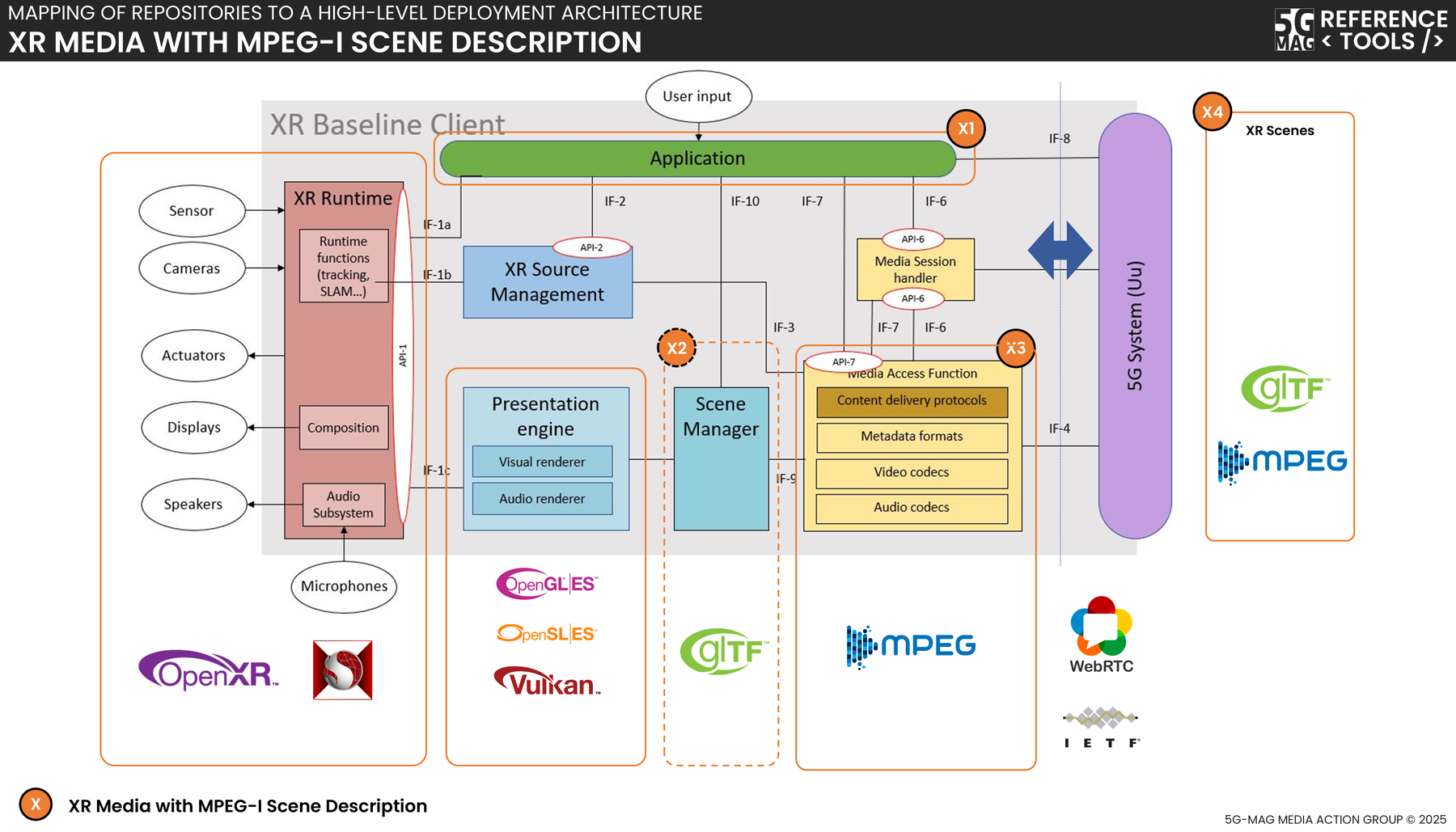
Figure: high-level view of how XR media is delivered over 5G, from the content and scene server through 5G Media Streaming to the XR player.
The diagrams and code in this project are split across two repository groups:
- XR Media with MPEG-I SD: Resources for the XR player, server, MAF and content repositories.
- Common Tools for the shared libraries reused across projects.
XR Unity Player: Project overview
Scene description format
The Scene Description format standardized by ISO/IEC JTC 1/SC29/WG03 MPEG Systems in ISO/IEC 23090-14 specifies a framework for composing 3D scenes for immersive experiences. It supports anchoring 3D assets in the real world, rich interactivity, and real-time media delivery.
It establishes interfaces like the Media Access Function (MAF) API for cross-platform interoperability, decoupling the Presentation Engine from the media pipeline for efficient retrieval and processing of media data. The Presentation Engine is the component that renders the scene (here, the Unity player); the MAF API is the interface it uses to fetch and read media without depending on any specific transport or codec.
XR Player implementation
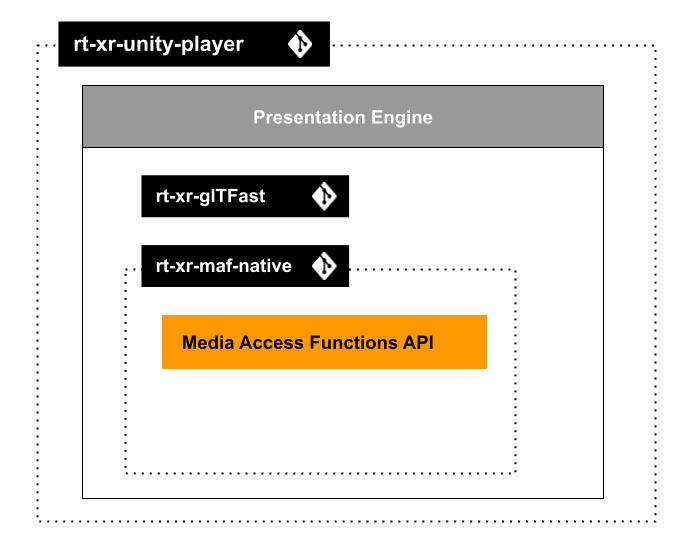
Figure: overview of the XR player and its main building blocks.
The XR Player is implemented as a Unity3D project: rt-xr-unity-player.
The unity project builds on the following dependencies:
- rt-xr-glTFast: parsing and instantiating of 3D scenes in Unity.
- rt-xr-maf-native: a C++ Media Access Functions (MAF) API implementation, extensible with custom media pipeline plugins.
Test content
- rt-xr-content: test content implementing the scene description format.
See the Resources page for implementation status of the scene description format.
MAF API & Media pipelines
The Media Access Functions (MAF) API is specified in ISO/IEC 23090-14:2023.
Its purpose is to decouple the presentation engine from media pipeline management; it allows the Presentation Engine to:
- pass View information to the media pipelines (e.g., to optimise fetching media)
- read media buffers updated by the media pipelines
The MAF API is protocol and codec agnostic; media can be fetched from a remote URL.
Media player implementation
MediaPlayer component
The MediaPlayer component is part of the Presentation Engine layer:
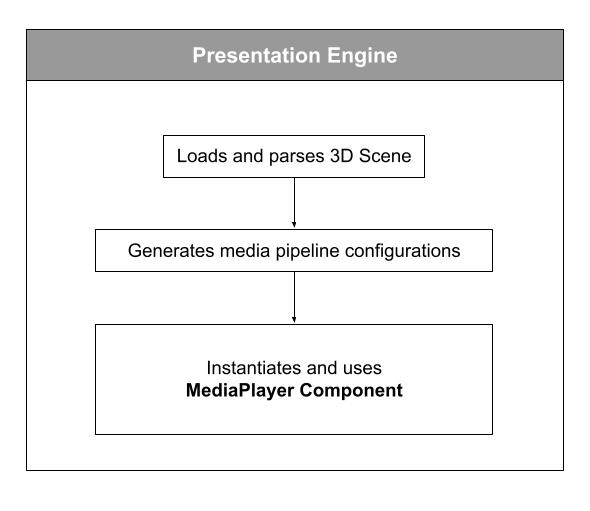
Figure: the MediaPlayer component inside the Presentation Engine layer.
The MediaPlayer component uses the MAF API implemented by Media Pipelines:
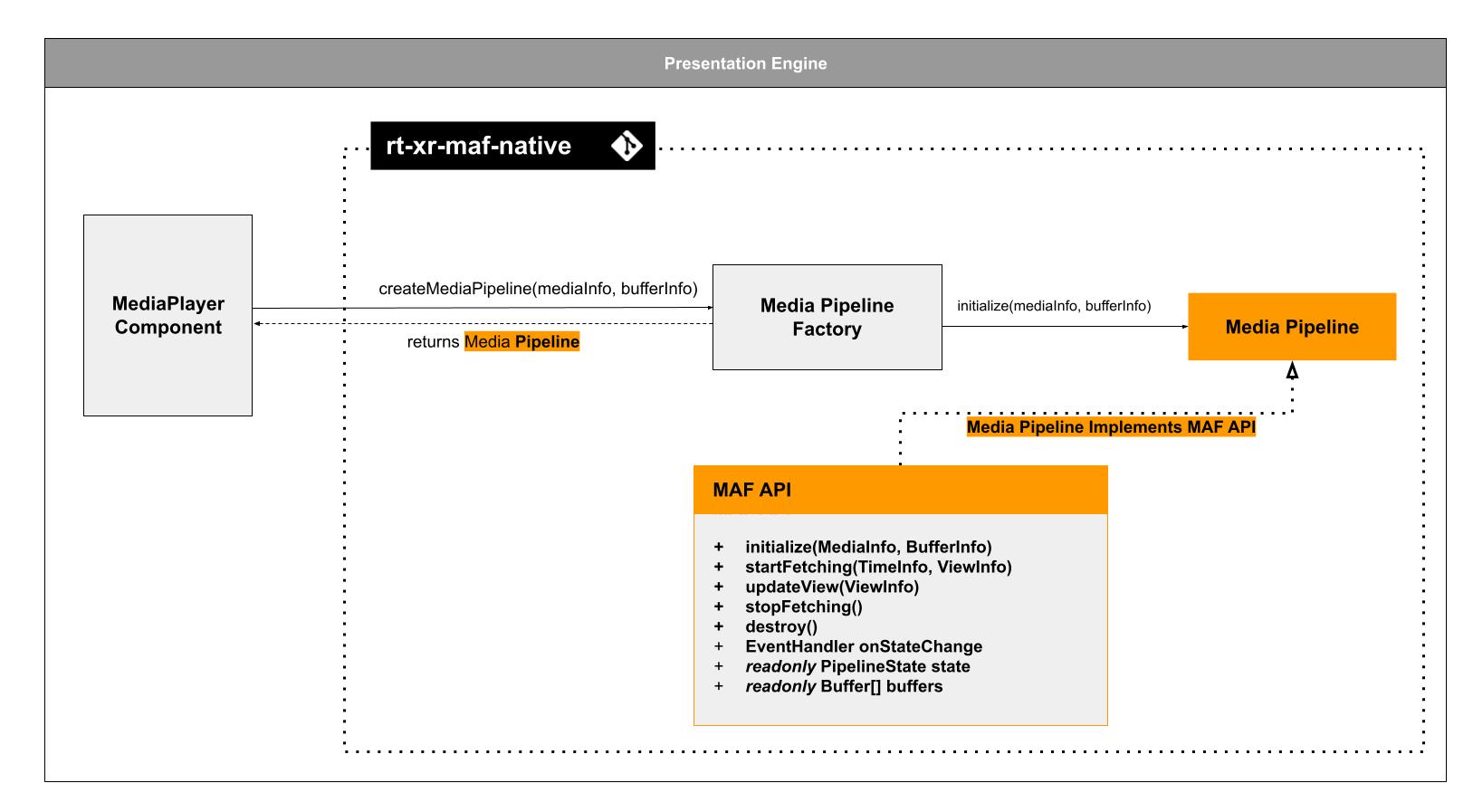
Figure: the MediaPlayer component calling the MAF API implemented by the media pipelines.
The XR Player uses a C++ implementation of the MAF API. It uses a factory / plugin pattern to allow development of media pipelines.
The mechanism by which a media pipeline is instantiated and buffers are initialized is out of the scope of ISO/IEC 23090-14.
For more on the MAF API implementation, review the rt-xr-maf-native repository.
How the tools map to the standard
The reference tools split along the same boundary as ISO/IEC 23090-14:
| Standard concept (ISO/IEC 23090-14) | Reference tool | Repository |
|---|---|---|
| Scene document (glTF 2.0 + MPEG extensions) | Test content | rt-xr-content |
| Parsing and instantiating the scene | glTFast fork with MPEG extensions | rt-xr-glTFast |
| Presentation Engine (renders the scene) | Unity player | rt-xr-unity-player |
| Media Access Function (MAF) API and media pipelines | C++ MAF implementation with a factory/plugin pattern | rt-xr-maf-native |
| Buffer interface between MAF and Presentation Engine | MediaPlayer component reading MAF-filled buffers | (in the player) |
Anchoring and pose handling on the two device families are provided through Unity's ARFoundation (ARCore on Android handhelds, the HMD's own tracking on head-mounted displays), so the MPEG_anchor trackable types in the feature table map onto the trackables ARFoundation exposes on each platform.
For hands-on setup, building the player and loading a first scene, see Tutorials.
The glTF extension support shown in the tables reflects the state of the reference tools and can change between releases; check the linked repositories and release notes for the current status. The out-of-scope 3GPP identifiers referenced above (TS 26.119, TS 26.565, and the 5G Media Streaming specifications) are tracked on the Standards and Tech views and were not confirmed here against a primary source; verify those against the 3GPP/ETSI work plan before relying on them.