This tutorial describes a basic setup to deliver emergency alerts compliant with the Cell Broadcast Service (CBS) over the rt-mbms-tx-for-qrd-and-crd transmitter from Reference Tools.
rt-mbms-tx-for-qrd-and-crd 5G Broadcast transmitter used throughout this tutorial.By the end of this tutorial, a real 5G Broadcast capable handset will display an emergency alert broadcast from your own Software Defined Radio (SDR). You will need the hardware listed under Prerequisites, in particular an SDR and a compatible receiving device.
What you will build: an end-to-end emergency alert chain, where a 5G Broadcast transmitter driven by an SDR broadcasts a CBS alert that is received and shown on a device.
Prerequisites
The following components are required to set up the end-to-end chain for emergency alerts:
- A QRD or CRD device. These are the 5G Broadcast capable receiving devices used with the transmitter (confirm the exact meaning of the QRD and CRD abbreviations against the rt-mbms-tx-for-qrd-and-crd repository).
- A Software Defined Radio (SDR) such as the BladeRF with an antenna connected to the TX1 port.
- A Linux machine running Ubuntu 22.04.
Architecture
The setup consists of a 5G Broadcast transmitter (rt-mbms-tx-for-qrd-and-crd) connected to a Software Defined Radio (SDR). A QRD or CRD device receives the broadcast signal and decodes the Cell Broadcast Service (CBS) alert messages. The transmitter reads alert content from a configuration file and encodes it as CBS messages compliant with 3GPP TS 23.041.
Installation
Step 1: Install the 5G Broadcast Transmitter
Install the dependencies and SDR drivers for the transmitter as documented in the transmitter repository.
Next, clone the transmitter repository:
git clone --recurse-submodules https://github.com/5G-MAG/rt-mbms-tx-for-qrd-and-crd.git rt-mbms-tx-for-qrd-and-crd-emergency-alerts
Now build the transmitter running the following commands:
cd rt-mbms-tx-for-qrd-and-crd-emergency-alerts
git submodule update
mkdir build && cd build
cmake -GNinja ..
ninja
Configuration
Step 2: Configuration of the 5G Broadcast Transmitter
Follow the configuration instructions documented in the transmitter README, section "Configuration after installation".
Make sure to adjust the dl_freq and the dl_earfcn in the enb.conf based on the frequency that your CRD or QRD device is operating on. To derive the right dl_earfcn you can use
this tool. Note also that SoapySDR might detect the wrong output (e.g. an audio device instead of your SDR.). In that case make sure to use device_name and device_args to select the right output device.
Example configuration files are located under the configuration-template directory. These will be called when running.
Copy the bytecode file to a folder /home/fivegmag.
cd ~/rt-mbms-tx-for-qrd-and-crd-emergency-alerts/Config-Template
cp bytecode /home/fivegmag/bytecode
Running
Step 3: Running the 5G Broadcast Transmitter
The transmitter is made up of three components you start in separate terminals:
- MBMS-GW (Multimedia Broadcast Multicast Service Gateway): receives the multicast alert traffic and forwards it towards the radio.
- EPC (Evolved Packet Core): the LTE core network functions the transmitter relies on.
- eNodeB (the LTE base station): produces the broadcast radio signal via the SDR.
The MBMS-GW receives multicast packets on one tunnel interface, packages them to GTP-U packets and sends them to the eNodeB over another tunnel interface. The command below creates the sgi_mb interface used for that multicast traffic:
sudo route add -net 239.11.4.0 netmask 255.255.255.0 dev sgi_mb
Start the MBMS Gateway, EPC and eNodeB in different terminals, in that order (gateway first, then EPC, then eNodeB):
cd ~/rt-mbms-tx-for-qrd-and-crd-emergency-alerts/build
sudo ./srsepc/src/srsmbms ../Config-Template/mbms.conf
cd ~/rt-mbms-tx-for-qrd-and-crd-emergency-alerts/build
sudo ./srsepc/src/srsepc ../Config-Template/epc.conf
cd ~/rt-mbms-tx-for-qrd-and-crd-emergency-alerts/build
sudo ./srsenb/src/srsenb ../Config-Template/enb.conf
Note that some of these files point to directories which should be adapted for your own setup. For instance user_db.csv inside epc.conf points to db_file = /home/fivegmag/rt-mbms-tx-for-qrd-and-crd-emergency-alerts/Config-Template/user_db.csv
Step 4: Start the UE
Now that the transmitter is running you can turn on your receiving device (the UE). You should receive an alert shortly after the device is turned on. The screenshot below shows an example alert displayed on the device:
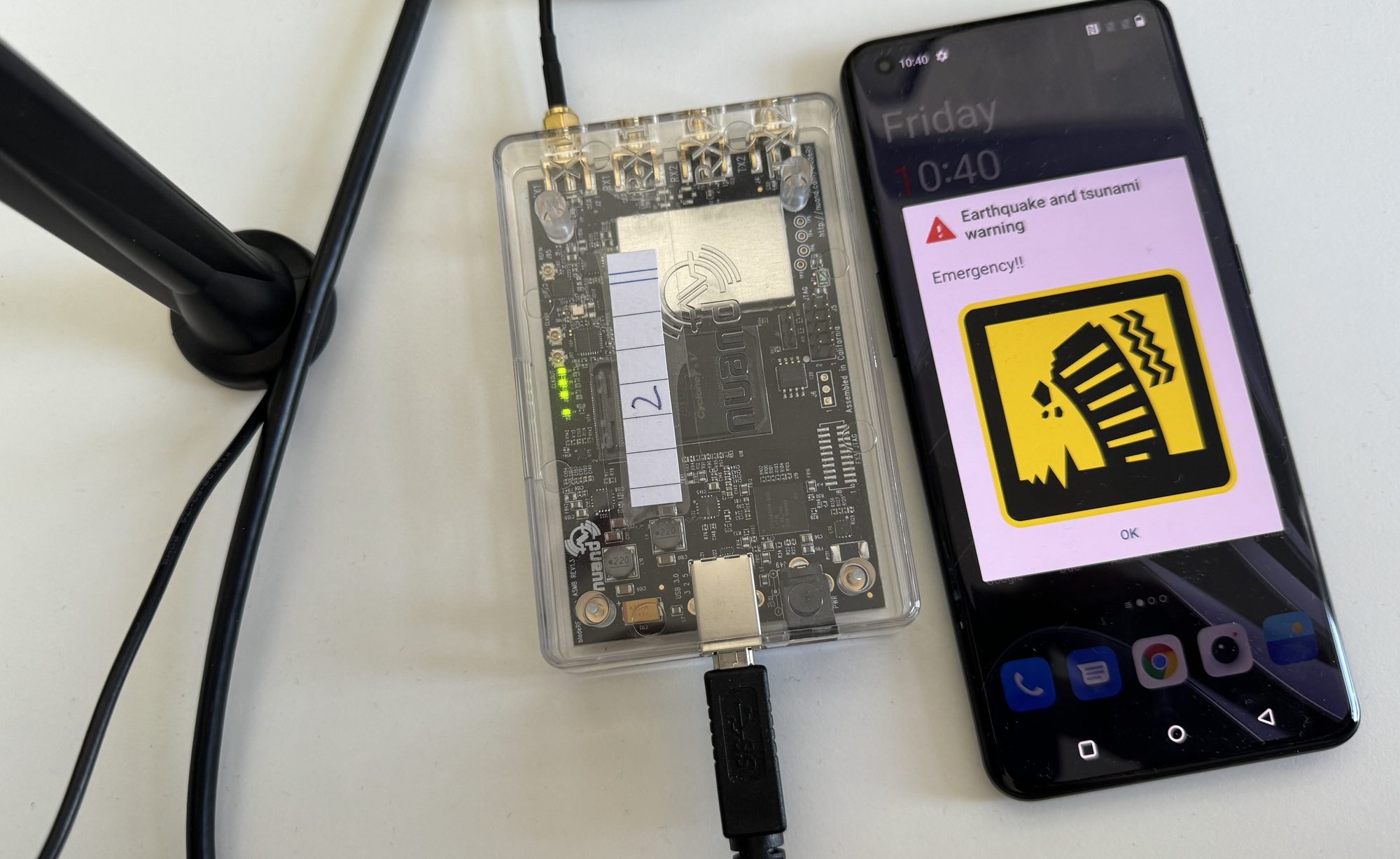
Figure: an emergency alert shown on the receiving device.
Step 5: Changing the type of the alert
With the current implementation, the SIB 12 payload is static and defined in Config-Template/sib.conf.mbsfn. To change the type
of the alert you need to open Config-Template/sib.conf.mbsfn and change the message_identifier. A list of possible values is
defined in 3GPP TS 23.041 Section 9.4.1.2.2. The example below sets message_identifier to 0x1102, which corresponds to the combined earthquake and tsunami warning row in the table that follows:
sib12 =
{
    message_identifier = 0x1102;
    serial_number = 0x0001;
    data_coding_scheme = 01;
    warning_msg_segment_type = "lastSegment";
    warning_msg_segment_num = 0;
    warning_msg_segment_r9 = "01C576597E2EBBC7F950A8D168341A8D46A3D168341A8D46A3D168341A8D46A3D168341A8D46A3D168341A8D46A3D168341A8D46A3D168341A8D46A3D168341A8D46A3D168341A8D46A3D168341A8D46A3D1000A";
};
The table below lists the message identifiers and their meaning. ETWS is the Earthquake and Tsunami Warning System and CMAS is the Commercial Mobile Alert System; both are public warning message categories carried over CBS.
| message_identifier | Description |
|---|---|
| 0x1100 | ETWS CBS Message Identifier for earthquake warning message |
| 0x1101 | ETWS CBS Message Identifier for tsunami warning message |
| 0x1102 | ETWS CBS Message Identifier for earthquake and tsunami combined warning message |
| 0x1104 | ETWS CBS Message Identifier for messages related to other emergency types |
| 0x1112-1130 | CMAS CBS Message Identifier |
| 0x1131-113B | Non-ETWS CBS Message Identifier |
Step 6: Triggering multiple alerts
To trigger a new alert the serial_number needs to be changed. At this point, there is no interface to change
the serial_number while the eNodeB is still running. You will need to change the serial_number
in build/sib.conf.mbsfn manually (this is the build-time copy the running transmitter reads) and then restart the eNodeB.
Wrapping up
You have set up an end-to-end emergency alert chain: building and configuring the 5G Broadcast transmitter, broadcasting a CBS alert carried in SIB12 over your SDR, and receiving and displaying it on a device. You also saw how to change the alert type through message_identifier and how to trigger repeat alerts by changing serial_number.
Transmitting radio signals is subject to local regulation. Only transmit in a shielded environment or under an appropriate authorisation, and check the rules that apply to your frequency and location before running the transmitter.
Next steps
- Read the Implementation status page for the specifications and architecture behind this setup.
- See the related 5G Broadcast - TV and Radio Services project for the base transmitter and receiver tools.