A DVB-I client has to find service lists before it can show any channel. The DVB-I Service List Registry is the component it asks: an HTTP endpoint that answers a query with the entry points of the service lists that match it (ETSI TS 103 770 V1.2.1, clause 5.1.3.2). In this tutorial you run the registry, send it the queries of that clause, register a service list of your own, and check what it answers against the DVB-I schema.
Read the README of rt-dvb-i-service-list-registry before you start. The other repositories below are only needed in the sections that name them.
DVB-I Service List Registry
rt-dvb-i-service-list-registryAnswers DVB-I client queries with a list of Service List Entry Points, per ETSI TS 103 770 V1.2.1 clause 5.1.3.2.
DVB-I Application Provider
rt-dvb-i-application-providerPublishes a DVB-I service list and its content guide, and gives an editor for maintaining them, per ETSI TS 103 770.
DVB-I Application
rt-dvb-i-applicationA browser DVB-I client that discovers a service list, presents its channels with their content guide, and plays them, per ETSI TS 103 770.
Where the other repositories are used:
rt-dvb-i-application-provider: Tutorial: DVB-I Application Providerrt-dvb-i-application: Tutorial: DVB-I Application
| You want | Go to |
|---|---|
| A registry answering queries in a minute | 1. Run the registry |
| To see what it holds and try a query in a browser | 2. The page at / |
| Your own service list offered to clients | 3. Register a service list |
| To filter by country, delivery, language or provider | 4. Query it |
| To know the answer is valid DVB-I | 5. Check a response against the schema |
| A different port or registry file | 6. Configure it |
You need: a Linux machine with git, Node.js 20 or later with npm, and curl; about 30 MB of disk. For section 5 you also need python3 with the venv module and the DVB-I schema files (see that section).
1. Run the registry
cd ~
git clone https://github.com/5G-MAG/rt-dvb-i-service-list-registry.git
cd rt-dvb-i-service-list-registry
npm install
npm start
The registry prints where it listens (the first line is a log record, so its time differs):
{"time":"2026-10-20T22:36:22.147Z","level":"info","msg":"Service List Registry listening","port":7000}
DVB-I Service List Registry  ->  http://localhost:7000/query
In a second terminal, ask it for the service lists that target Switzerland:
curl -s 'http://localhost:7000/query?TargetCountry=CHE'
<?xml version="1.0" encoding="UTF-8"?>
<ServiceListEntryPoints
  xml:lang="en"
  xmlns="urn:dvb:metadata:servicelistdiscovery:2024"
  xmlns:dvbisd-t="urn:dvb:metadata:servicediscovery-types:2023"
  xmlns:mpeg7="urn:tva:mpeg7:2008"
  xmlns:tva="urn:tva:metadata:2024">
  <ServiceListRegistryEntity>
    <Name>5G-MAG Reference Service List Registry</Name>
  </ServiceListRegistryEntity>
  <ProviderOffering>
    <Provider>
      <Name>5G-MAG</Name>
    </Provider>
    <ServiceListOffering>
      <dvbisd-t:ServiceListName>5G-MAG</dvbisd-t:ServiceListName>
      <dvbisd-t:ServiceListURI contentType="application/xml">
        <dvbisd-t:URI>http://localhost:4000/service-list.xml</dvbisd-t:URI>
      </dvbisd-t:ServiceListURI>
      <dvbisd-t:Delivery>
        <dvbisd-t:DASHDelivery/>
      </dvbisd-t:Delivery>
      <dvbisd-t:Language>en</dvbisd-t:Language>
      <dvbisd-t:TargetCountry>CHE</dvbisd-t:TargetCountry>
      <dvbisd-t:TargetCountry>DEU</dvbisd-t:TargetCountry>
      <dvbisd-t:TargetCountry>ESP</dvbisd-t:TargetCountry>
      <dvbisd-t:ServiceListId>tag:5g-mag.org,2026:servicelist:local-demo</dvbisd-t:ServiceListId>
    </ServiceListOffering>
  </ProviderOffering>
</ServiceListEntryPoints>
That is a Service List Entry Point: the name of a list, the URL where a client fetches it, and what it delivers. The one in the stock file points at http://localhost:4000/service-list.xml, where the DVB-I Application Provider publishes its list.
Ask for a country nothing targets:
curl -s 'http://localhost:7000/query?TargetCountry=ITA'
The answer is a valid document with the ServiceListRegistryEntity and no ProviderOffering, as clause 5.1.3.2 requires when nothing matches.
Sections 2 to 5 use this terminal's registry. Stop it with Ctrl+C when you reach section 7.
2. The page at /
Open http://localhost:7000/ in a browser. The page lists what the registry holds, one row for each service list, and has a form for the queries of clause 5.1.3.2: type a country code, choose a delivery type, a provider and the regulator flag, then press Run. It shows the address it called and the response.
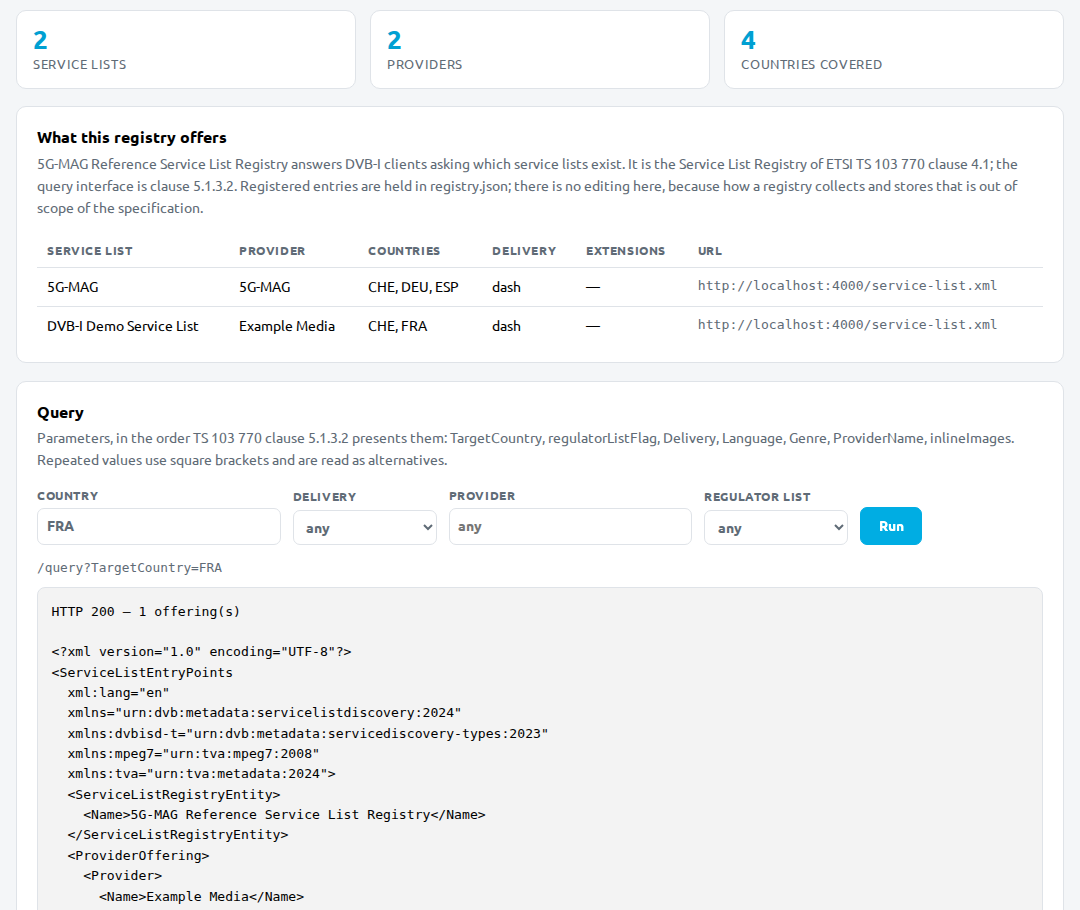
The page is read only. The registry holds its entries in registry.json, and you change them there, as the next section shows.
3. Register a service list
Clause 5.1.3.2 leaves open how a registry collects and stores the entry points of the providers, so the repository keeps them in one file, registry.json. The registry reads it on every request: you edit it and query again, with no restart.
Open registry.json. Under providers is a list of providers, each with its offerings. Add a provider after the existing one:
    {
      "name": "Example Media",
      "offerings": [
        {
          "id": "tag:example.com,2026:servicelist:tutorial",
          "name": "DVB-I Demo Service List",
          "uris": ["http://localhost:4000/service-list.xml"],
          "delivery": ["dash"],
          "languages": ["en", "fr"],
          "genres": [],
          "countries": ["CHE", "FRA"],
          "regulator": false,
          "extensions": []
        }
      ]
    }
| Field | What to put |
|---|---|
id | The identifier of your service list. It should be the id attribute of the list itself and never change (TS 103 770 V1.2.1, clause 5.3.5, table 12, ServiceListId) |
name | The name of the list. It shall be the same as the Name element of the list (same table, ServiceListName) |
uris | The URL or URLs where a client fetches the list |
delivery | One or more of dash, dvb-t, dvb-c, dvb-s, rtsp, multicast-ts, application |
languages, countries | Audio languages (en) and countries (ISO 3166 alpha-3 such as FRA) the list targets. An offering with none is returned for every value of that parameter |
genres, regulator, extensions | Leave as shown. regulator is true only for the list a national regulator publishes |
The values above match the list you make in Tutorial: DVB-I Application Provider; change them if your list differs.
Check that the registry now offers it:
curl -s 'http://localhost:7000/query?TargetCountry=FRA' | grep -E 'ServiceListName|ServiceListId|URI>'
      <dvbisd-t:ServiceListName>DVB-I Demo Service List</dvbisd-t:ServiceListName>
        <dvbisd-t:URI>http://localhost:4000/service-list.xml</dvbisd-t:URI>
      <dvbisd-t:ServiceListId>tag:example.com,2026:servicelist:tutorial</dvbisd-t:ServiceListId>
If the file is not valid JSON the registry answers 500 Registry unavailable and logs the reason, so a typo shows at once.
4. Query it
Every recipe is curl -g -s '<registry>/query?<parameters>'. The -g lets curl take the square brackets as they are. The parameters are those of clause 5.1.3.2, in the order it lists them: TargetCountry, regulatorListFlag, Delivery, Language, Genre, ProviderName, inlineImages.
| You want | Query | Offerings returned with the two lists of section 3 |
|---|---|---|
| The lists for one country | TargetCountry=CHE | 2 |
| One country only the new list has | TargetCountry=FRA | 1 |
| Either of two countries | TargetCountry[]=CHE&TargetCountry[]=FRA | 2 |
| One provider | ProviderName=Example%20Media | 1 |
| One audio language | Language=fr | 1 |
| A country and a delivery method together | TargetCountry=FRA&Delivery=dvb-t | 0 |
Repeated values of one parameter are alternatives (OR); different parameters narrow the result together (clause 5.1.3.2). The Delivery values are those of table 12b: dvb-dash, dvb-t, dvb-c, dvb-s, dvb-iptv and application, not the names used in registry.json.
Check: count the offerings in an answer.
curl -g -s 'http://localhost:7000/query?TargetCountry[]=CHE&TargetCountry[]=FRA' | grep -c '<ProviderOffering>'
2
Wrong queries are refused, as the clause requires:
curl -s -w '\n%{http_code}\n' 'http://localhost:7000/query?Foo=1'
curl -s -w '\n%{http_code}\n' 'http://localhost:7000/query?Delivery=dvb-xx'
Unknown query parameter "Foo". Accepted, in this order: TargetCountry, regulatorListFlag, Delivery, Language, Genre, ProviderName, inlineImages.
400
Invalid Delivery "dvb-xx". Accepted: dvb-dash, dvb-t, dvb-c, dvb-s, dvb-iptv, application.
400
A request URL longer than 2 048 characters, the limit of the clause, gets 414.
The registry's tests
The repository has unit tests that follow the clause: which parameters exist, how repeated values combine, and which status a bad query gets.
npm test
They finish with pass 14 and fail 0. Its last step, the schema check, skips until you give it the schema files (section 5) and then prints ALL VALID. The line that says NOT CHECKED is about the 5G broadcast extension, which the DVB schemas do not define; the DVB-I over 5G tutorials cover it.
5. Check a response against the schema
A registry answer is a ServiceListEntryPoints document. Its schema is dvbi_service_list_discovery_v1.6.xsd (TS 103 770 V1.2.1, clause 5.3.1 and annex B). The repository does not carry schema files; you supply them from a folder outside the clone.
-
Get the schema files. They come with the specification, in the electronic attachment archive of ETSI TS 103 770 (named in annex B and in the repository's README). Put them in one folder, for example
~/dvb-i-schemas. The folder needsdvbi_service_list_discovery_v1.6.xsdand the files it imports:dvbi_types_v1.0.xsd,tva_metadata_3-1_2024.xsd,tva_mpeg7.xsdandxml.xsd. -
Run the repository's own check:
DVBI_SCHEMAS=~/dvb-i-schemas npm run test:xsd+ fixture, no query parameters: VALID+ fixture, TargetCountry=ITA: VALID+ fixture, regulatorListFlag=true: VALID+ fixture, Delivery[]=dvb-dash&Delivery[]=dvb-t: VALID+ fixture, no matches: VALID+ registry.json as shipped: VALID~ fixture + LOCAL 5G delivery extension: NOT CHECKED ...==== ALL VALID (1 not checked, see above) ==== -
Check any answer yourself. Save this as
check.pyoutside the clone:import sysfrom lxml import etreeschema_file, doc_file = sys.argv[1], sys.argv[2]schema = etree.XMLSchema(etree.parse(schema_file))doc = etree.parse(doc_file)if schema.validate(doc):print("VALID:", doc_file)else:print("INVALID:", doc_file)for error in schema.error_log:print(f" line {error.line}: {error.message}")sys.exit(1)python3 -m venv ~/dvbi-check~/dvbi-check/bin/pip install lxmlcurl -g -s 'http://localhost:7000/query?TargetCountry[]=CHE&TargetCountry[]=FRA' > answer.xml~/dvbi-check/bin/python check.py ~/dvb-i-schemas/dvbi_service_list_discovery_v1.6.xsd answer.xmlVALID: answer.xml
The run for this page used copies of the schema files from the schemas folder of a third-party repository, paulhiggs/dvb-i-tools, because a download of the ETSI archive from the command line was refused (HTTP 403). The ETSI archive was not opened for this page, so which of the five files it contains is taken from the repository's README and from annex B, not from the archive itself.
6. Configure it
The registry reads three environment variables (README):
| Variable | Default | What it does |
|---|---|---|
PORT | 7000 | The port it listens on |
REGISTRY_PATH | registry.json | The registry file to read |
LOG_LEVEL | info | error, warn, info or debug |
For example, a second registry with its own file on another port:
cp registry.json ~/my-registry.json
PORT=7001 REGISTRY_PATH=$HOME/my-registry.json npm start
TS 103 770 V1.2.1, clause 7.3, says a DVB-I client uses HTTP over TLS to reach a Service List Registry, and allows plain HTTP only when the registry is on the same private subnet as the client. The registry listens on plain HTTP, so for a client on another network put a reverse proxy that terminates TLS in front of it.
7. Stop and clean up
Press Ctrl+C in the registry's terminal. To remove it, delete ~/rt-dvb-i-service-list-registry, ~/dvb-i-schemas and ~/dvbi-check.
To see a client use your registry, follow Tutorial: DVB-I Application, section 4.
What was run for this page
Every command above was run on a clean clone of main (commit 97721a6) on Ubuntu Linux with Node.js 24.21.0 and npm 11.19.0, Python 3.14.4 and lxml 6.1.3 (libxml2 2.14.6). The registry's dependencies were installed with the plain npm install of section 1.
Section by section: 1 run; 2 run in a headless Chromium (page loaded, query run, screenshot taken); 3 run (the second provider added, the answer read back with no restart); 4 run (every query in the table, the two refusals and the 414); 5 run with the schema files described in the note, npm run test:xsd and check.py both valid; 6 run once (second registry on port 7001 with a copy of the stock file); the TLS note is from the specification and the code and was not run. The registry's npm test printed 14 passes.
A VALID result means the response matches the schema.