A DVB-I service can be offered on 5G Broadcast and on unicast at the same time. ETSI TR 103 972 V1.1.1 clause 6.4.3.1 models it as two service instances of one service, and clause 6.4.3.2 says the 5G Broadcast instance may be given the higher priority with the @priority attribute of the service instance. In this tutorial you publish such a service with the DVB-I Application Provider and open it in the DVB-I Application, the browser client.
This tutorial is about the signalling in the service list. Receiving the broadcast needs an MBMS Client on the device (TS 103 770 V1.2.1 clause 9.3.3); no repository of this project provides one yet, so the client plays the unicast instance (section 3).
Read the README of rt-dvb-i-application-provider before you start; its section "The local 5G broadcast extension" is the part this tutorial uses. Read the README of rt-dvb-i-application when you reach section 3.
DVB-I Application Provider
rt-dvb-i-application-providerPublishes a DVB-I service list and its content guide, and gives an editor for maintaining them, per ETSI TS 103 770.
DVB-I Application
rt-dvb-i-applicationA browser DVB-I client that discovers a service list, presents its channels with their content guide, and plays them, per ETSI TS 103 770.
DVB-I over 5G Reference App
rt-dvb-i-android-applicationA native Android DVB-I client: it discovers a service list, presents its channels with their content guide, and plays them with Media3 ExoPlayer, per ETSI TS 103 770.
Where each repository is used:
rt-dvb-i-application-provider: 1. Run the provider, 2. Publish a service on 5G Broadcast and unicastrt-dvb-i-application: 3. See it in a DVB-I clientrt-dvb-i-android-application: 4. What a receiver does with the instance
| You want | Go to |
|---|---|
| The provider publishing a list in a minute | 1. Run the provider |
| A service on 5G Broadcast and on unicast | 2. Publish a service on 5G Broadcast and unicast |
| The client showing it | 3. See it in a DVB-I client |
| To know what each value means in the specifications | 4. What a receiver does with the instance |
| Proof of what you published | 5. Check what you published |
You need: a Linux machine with git, Node.js 20 or later with npm, curl and a browser; about 30 MB of disk and a connection to the internet, because the unicast instance uses a public DASH test stream. Section 5 also needs the DVB-I schema files, as in Tutorial: DVB-I Application Provider.
1. Run the provider
cd ~
git clone https://github.com/5G-MAG/rt-dvb-i-application-provider.git
cd rt-dvb-i-application-provider
npm install
npm start
DVB-I Application Provider and Admin Portal  →  http://localhost:4000
Service list    →  http://localhost:4000/service-list.xml
In a second terminal:
curl -s http://localhost:4000/api/health
{"status":"ok","version":2,"services":3}
The stock list has three channels. Tutorial: DVB-I Application Provider explains the admin portal.
2. Publish a service on 5G Broadcast and unicast
The routine is that of the provider tutorial, sections 1 and 3: edit in the portal, Save Service, Save & Publish, then read the published XML. Open http://localhost:4000/.
-
In the Service List Settings, type a Service List ID that is a
tag:URI of your own, for exampletag:example.com,2026:servicelist:tutorial-5g. -
In the services toolbar, choose Reference service (all fields, DASH) and press Load Template.
-
Change these fields:
Field Value Service Name Hybrid Tutorial ChannelLCN 4Unique ID (UID) tag:example.com,2026:service:tutorial-hybridMulti-language service names, enlineHybrid Tutorial ChannelTarget Region (under the instances) empty Subscription Package empty -
The template has one instance, of type DASH. Set its Priority to
2, its Label toHybrid Tutorial Channel (unicast DASH)and its Stream URL tohttps://dash.akamaized.net/dash264/TestCasesUHD/2b/11/MultiRate.mpd, a public DASH test stream. -
Press + Add Instance. In the new instance, choose the type 5G / MBMS (extension) and set:
Field Value Priority 1Label Hybrid Tutorial Channel (5G Broadcast)MBMS service locator mbms://broadcast.example.com/tutorial-hybridMBMS service class empty (the provider then writes urn:dvb:metadata:serviceClass:DVB-I_Service_Instance:1)Unicast fallback URL https://dash.akamaized.net/dash264/TestCasesUHD/2b/11/MultiRate.mpd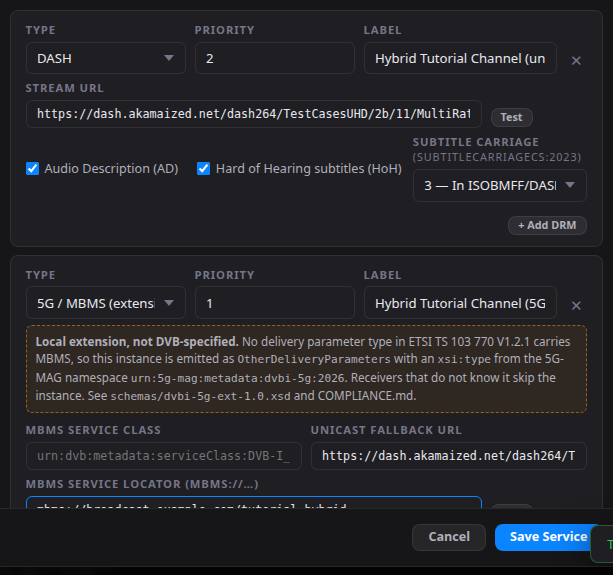
-
Press Save Service, then Save & Publish.
Check: the service has two instances, and the 5G one has priority 1.
curl -s http://localhost:4000/service-list.xml | sed -n '/<!-- Hybrid Tutorial Channel -->/,/<ServiceName xml:lang="en"/p' | grep -E 'ServiceInstance|DisplayName|Delivery|dvbi5g:|URI|Local ext'
    <ServiceInstance priority="2">
      <DisplayName>Hybrid Tutorial Channel (unicast DASH)</DisplayName>
      <DASHDeliveryParameters>
          <dvbisd-t:URI>https://dash.akamaized.net/dash264/TestCasesUHD/2b/11/MultiRate.mpd</dvbisd-t:URI>
      </DASHDeliveryParameters>
    </ServiceInstance>
    <ServiceInstance priority="1">
      <DisplayName>Hybrid Tutorial Channel (5G Broadcast)</DisplayName>
      <!-- Local extension, not DVB-specified: see schemas/dvbi-5g-ext-1.0.xsd and COMPLIANCE.md -->
      <OtherDeliveryParameters extensionName="urn:5g-mag:dvbi-5g:mbms" xsi:type="dvbi5g:MBMSDeliveryParametersType">
        <dvbi5g:ServiceLocator>mbms://broadcast.example.com/tutorial-hybrid</dvbi5g:ServiceLocator>
        <dvbi5g:ServiceClass>urn:dvb:metadata:serviceClass:DVB-I_Service_Instance:1</dvbi5g:ServiceClass>
          <dvbi5g:UnicastFallback>https://dash.akamaized.net/dash264/TestCasesUHD/2b/11/MultiRate.mpd</dvbi5g:UnicastFallback>
      </OtherDeliveryParameters>
    </ServiceInstance>
TS 103 770 V1.2.1 defines no delivery parameters for MBMS in its list of delivery parameter types (clauses 5.5.18.1 to 5.5.18.8), so the provider writes the 5G instance through the extension point OtherDeliveryParameters, with a type in the 5G-MAG namespace urn:5g-mag:metadata:dvbi-5g:2026. The namespace is declared in the list only when a service uses it. ETSI TR 103 972 V1.1.1 clause 6.2.4 records the missing element as a gap, and clause 6.4.3.3 prefers a separate instance type to signalling 5G Broadcast as DASH delivery. A client that does not know the namespace finds no delivery parameters it understands on that instance and uses another instance of the service.
In the portal, Validate reports 10 of 11 checks for this list: All stream URLs use http(s) fails with 1 URL(s) are not http/https, because the locator is an mbms:// URL. That is the expected result for this instance.
3. See it in a DVB-I client
cd ~
git clone https://github.com/5G-MAG/rt-dvb-i-application.git
cd rt-dvb-i-application
npm install
PROXY_ALLOW_ORIGINS="http://localhost:4000,http://127.0.0.1:4000" npm start
Open http://localhost:5000/?url=http://localhost:4000/service-list.xml. Channel 4 shows a dashed badge, 5G ext; hover over it for the tooltip, which names the extension and says it is local and not defined by any DVB specification. Select the channel, or press 4.
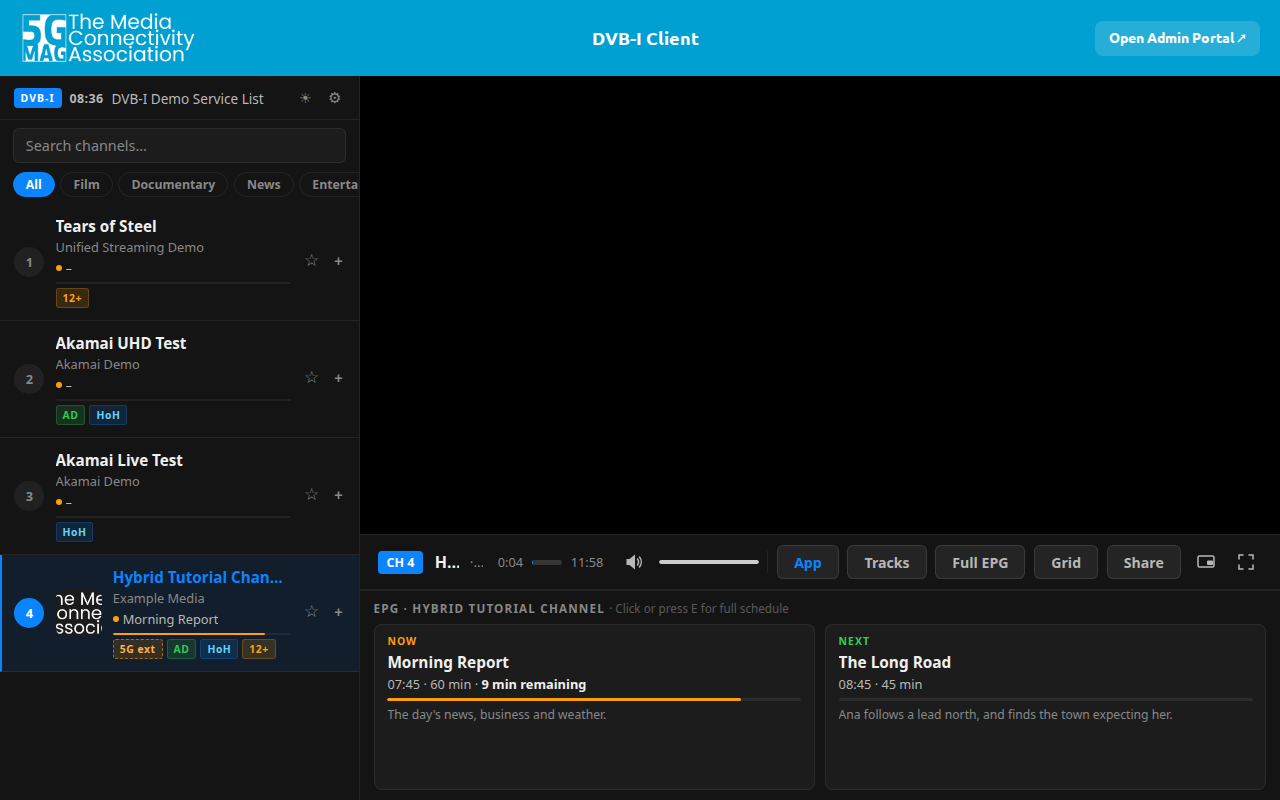
The picture area is black in this capture because it was taken in a headless browser without video codecs. In your browser the stream plays.
Check: which instance played. Open the developer tools of the browser on the Network tab. The client requested MultiRate.mpd and its segments from dash.akamaized.net, all with status 200, and made no request to an mbms:// address: a browser cannot join an MBMS bearer, so it uses the unicast instance.
4. What a receiver does with the instance
With an MBMS Client on the device, the specifications give the receiver these steps for an instance that carries an mbms:// locator:
| Step | What happens | Specification |
|---|---|---|
| The service class is read | The MBMS Client exposes the service class of each MBMS User Service to the DVB-I client, which acts as an MBMS-Aware Application. A service instance is conveyed in a User Service of class urn:dvb:metadata:serviceClass:DVB-I_Service_Instance:1 | ETSI TS 103 770 V1.2.1 clauses 9.3.1 (table 106) and 9.3.2; 3GPP TS 26.346 V19.3.0 clause 11.2.1.2 |
| The locator is read | An mbms:// URL has a prefix that is the serviceId of the MBMS User Service, and an optional &label= suffix for one resource | 3GPP TS 26.347 V18.1.0 clause 8.2.2 |
| The instance is selected | The DVB-I client invokes the MBMS Client to start reception of the User Service, then passes the application entry point document (for example the DASH MPD) that the User Service Description references to the media player | ETSI TS 103 770 V1.2.1 clause 9.3.3 |
| Reception starts | The MBMS-Aware Application selects the streaming service, the MBMS Client receives the MPD and segments and stores them in its Media Server, and the player reads them from there | ETSI TR 103 972 V1.1.1 clause 6.2.3.4, steps 33 to 48; 3GPP TS 26.347 V18.1.0 clause 6.3 |
| The instance is chosen among others | The signalled @priority is respected; lower values mean higher priority; an instance with video or audio that the client could not present is discarded | ETSI TS 103 770 V1.2.1 clauses 5.2.13 and 5.5.4 |
The unicast fallback in the extension, and the second instance with priority 2, are what a client without an MBMS Client plays.
TS 103 770 V1.2.1 clause 9.3.3 speaks of "a DVB-I service instance with an mbms:// locator" but names no element for it, and ETSI TR 103 972 V1.1.1 clause 6.2.4 records that as a gap. The service list does define IdentifierBasedDeliveryParameters (clause 5.5.18.8), "An identifier in the form of a locator (URL) or name (URN)". The Android client of rt-dvb-i-android-application reads an mbms:// locator from that element, checks it against TS 26.347 clause 8.2.2 and shows a 5G Broadcast badge; the provider and the browser client of this tutorial use the 5G-MAG extension of section 2 instead. A list written by the provider therefore shows the 5G instance as a 5G extension in the browser client, and the Android client treats it as a delivery it does not know and plays the DASH instance (Instances.kt, ServiceListParser.kt in rt-dvb-i-android-application).
5. Check what you published
Against the schema. The repository does not carry schema files; you supply them from a folder outside the clone, as in Tutorial: DVB-I Application Provider. With your schema folder in ~/dvb-i-schemas:
cd ~/rt-dvb-i-application-provider
DVBI_SCHEMAS=~/dvb-i-schemas npm run test:xsd
Service list (live config.json):
  ~ config.json: NOT CONFORMANT GROUND ...
(The line goes on to say that the list carries the local 5G delivery extension, which no published schema defines, that it is valid against the published schema composed with schemas/dvbi-5g-ext-1.0.xsd, and that this is not conformance to TS 103 770.) The check composes the published schema with schemas/dvbi-5g-ext-1.0.xsd and reports the list as valid against the two together. It labels the result so that it is not read as conformance to TS 103 770, which defines no such type.
In the portal. Compliance runs its structural checks on the list; for this list it reported 38 of 38.
6. Stop and clean up
Press Ctrl+C in the terminal of the provider and of the client. To remove them, delete ~/rt-dvb-i-application-provider and ~/rt-dvb-i-application.
What was run for this page, and the specifications read
Run on Ubuntu Linux with Node.js 24.21.0, npm 11.19.0 and Python 3.14.4, on clean clones of main: rt-dvb-i-application-provider 003ce59, rt-dvb-i-application 7a9ae28. The pages were driven in a headless Chromium (Playwright 1.64.1), which is also how the two pictures were taken.
Section by section:
- 1: Run (
/api/healthanswered as shown). - 2: Run. The template was loaded, the two instances filled in as in the tables, saved and published, and the XML read back as shown. Validate reported 10 of 11 and Compliance 38 of 38.
- 3: Partly run. The list loaded, the channel showed the 5G ext badge and its tooltip, and the channel played in the sense that the client requested
MultiRate.mpdand its audio segments, all with status 200; the picture was not shown because the headless browser has no video codecs, and playback was not watched in a desktop browser. - 4: Not run. It describes what the specifications say, read in the published documents: ETSI TS 103 770 V1.2.1, ETSI TR 103 972 V1.1.1, 3GPP TS 26.347 V18.1.0 and 3GPP TS 26.346 V19.3.0. No MBMS Client, 5G Broadcast receiver or transmitter was available. What the Android client does with
IdentifierBasedDeliveryParametersis from its code and README (553b4a4); it was not built or run (no JDK, no Android SDK, no device). - 5: Run (
npm run test:xsdwith the schema folder used for the other DVB-I tutorials). - 6: run.
ETSI TS 103 720 (5G Broadcast) was not read for this page.