This tutorial explains how to run the MBS-capable 5G Core (5GC) as a set of Docker containers, so you can bring up the whole MBS core network with a single Docker Compose deployment instead of building each Network Function by hand.
Two Docker Compose deployments of the MBS capable 5G Core are available:
rt-mbs-examples Docker Compose recipes for the MBS-capable 5G Core, plus the Python test suite used later in this tutorial.- The
internaldeployment connects all the developed Network Functions for MBS with one srsRAN gNB and one srsRAN UE running using the ZeroMQ driver - The
externaldeployment deploys only the developed Network Functions for MBS waiting for an external gNB connection
Which should I use? Choose the internal deployment for a self-contained first run: it includes a gNB and UE, so you can bring up everything on one machine with no extra hardware. Choose the external deployment when you want to connect your own (physical or separate) gNB to the MBS core over the N2 and N3mb interfaces.
The default Docker Compose build compiles Open5GS, the gNB and the UE from each fork's 5mbs branch. The MBSF and MBSTF containers are pulled as pre-built published images, so their tutorials reflect whichever image version is pinned in the deployment's configuration.
Architecture using Open5GS
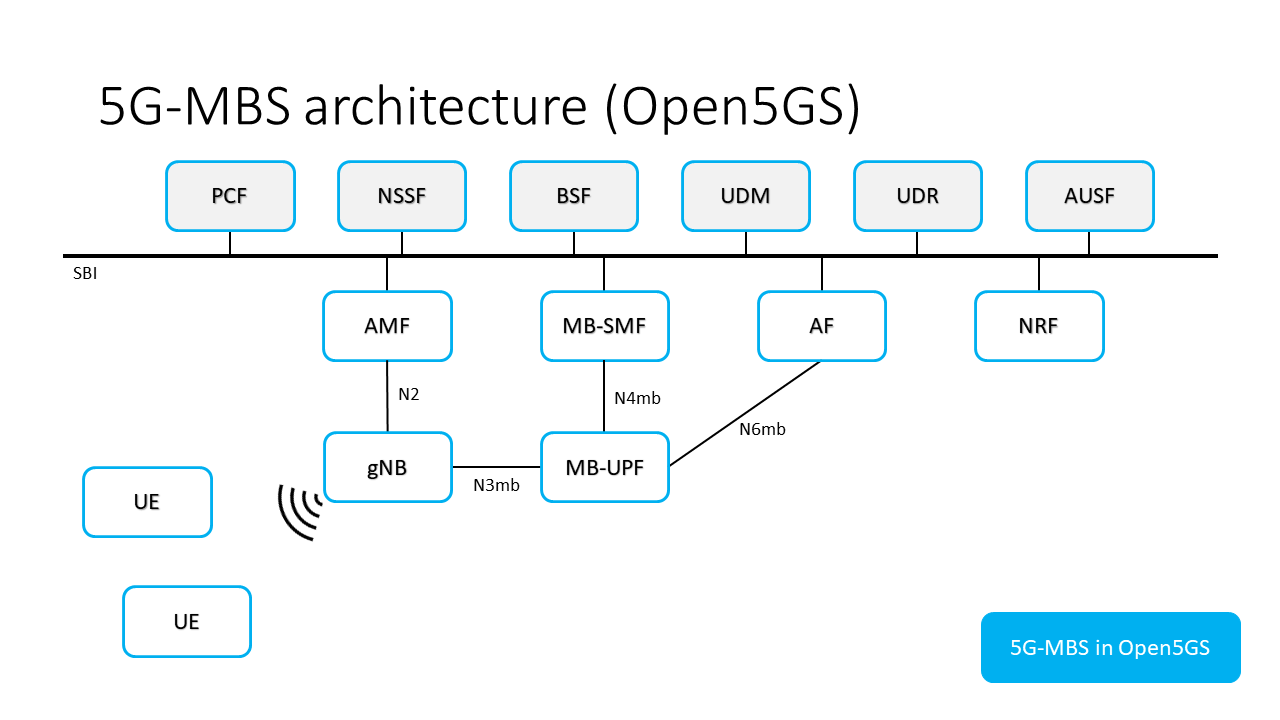
All the procedures related to the AMF, SMF and UPF of Open5GS work as expected when using the 5G-MAG components. As an example it is possible to create a standard PDU Session with a gNB and a UE while using the MBS capable 5G Core.
The following host ports are exposed by the deployments:
| Port | Exposed in | Purpose |
|---|---|---|
TCP 27017 | internal and external | Add subscribers to the MongoDB database |
SCTP 38412 | external | From the AMF for the NGAP N2 interface, the control-plane connection with the external gNB |
UDP 2152 | external | From the MB-UPF for the GTPU N3mb interface, the data-plane connection with the external gNB |
Modify the .env file present on this repository to change the values being deployed on docker-compose.yaml. Add your host's IP address to the DOCKER_HOST_IP variable in the .env file for the MB-UPF to be reachable by external gNBs.
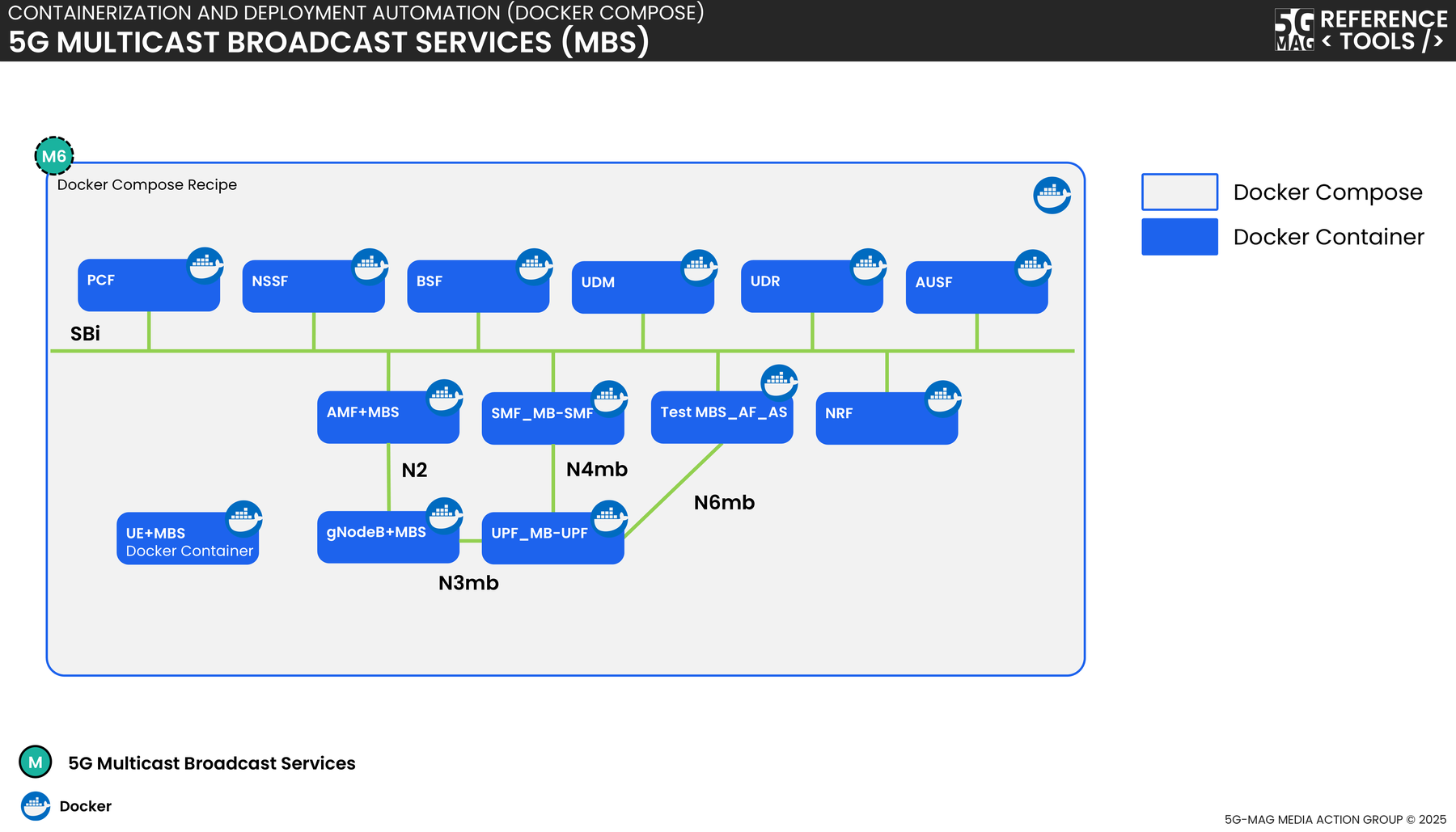
Mapping of container names and the architecture
The following image shows the relationship between the Architecture using Open5GS image and the names of the
containers.
Testing
This section explains how to use the Python tests present on the test directory in
the rt-mbs-examples repository.
The Python modules requirements are preinstalled on the AF/AS container image. This container mounts the test
directory as read-only to be able to run the tests.
To run the tests, execute an interactive session with the AF/AS container and navigate to the test directory:
docker exec -it test_mbs_af_as bash

# inside the AF/AS container
cd test

# to run the tests
python3 tests.py
The test directory contains the following subdirectories:
MB_SMFthe developed tests regarding the MB-SMF Network Functionutilsa Python package containing some common utils for the testssupportsome support files for the tests like JSON files for the requests and JSON schemas to validate them
Using the config.toml file some parameters can be configured:
- the log_level for the tests can be adjusted. The values supported are: DEBUG, INFO, WARNING, ERROR, CRITICAL
- some endpoint parameters like the MB-SMF address, the protocol (HTTP or HTTPS) and the port being used
The file tests.py contains the main logic for the tests. In this file the test suites are defined and run by the
unittest testing framework.
Detailed Instructions
Inspect all the traffic being sent in the network
You can use tcpdump/Wireshark to sniff all the messages being sent between the Network Functions by inspecting
the br-5g-mag network bridge. This bridge is created by the Docker Compose network and is used to connect all the
Network Functions.
$ tcpdump -i br-5g-mag
Connect to the AF/AS container to start sending requests to the Network Functions
The container named test_mbs_af_as is not a real Application Function or Application Server; it is a helper container used to send curl requests to the Open5GS APIs, standing in for an MBS Application Provider (AF/AS).
# Connect to the AF/AS container
docker exec -it test_mbs_af_as bash
Use curl inside the container to send requests to the other Network Functions:
# Inside the AF/AS container, example of the AF/AS sending the MB-SMF the TMGI allocate request
curl --http2-prior-knowledge \
  --request POST \
  --header "Content-Type: application/json" \
  --data '{ "tmgiNumber": 1 }' \
  smf-mb-smf.5g-mag.org:80/nmbsmf-tmgi/v1/tmgi
Configure the MB-UPF multicast
Apart from editing the .env for the MB-UPF to be reachable by external gNBs, the MB-UPF needs extra configuration. To
be able to detect the multicast traffic being sent and forward it to the lower layer source specific multicast (LLSSM)
address, the MB-UPF needs to update the multicast forwarding cache (MFC) in the linux kernel.
For this purpose, the smcroute tool is installed on the MB-UPF container. Through the smcroutectl command, the MFC
can be updated to the desired values. Currently this is done manually but other ways to update the MFC are being
studied.
# Execute this command inside the MB-UPF container
smcroutectl add eth0 <n6mb_ip_multicast_destination_address> ogstun
After this, and after creating the MBS Session, the project can be tested by using the AF/AS to send multicast traffic to the MB-UPF and inspecting the MB-UPF output:
# Execute this command inside the AF/AS container
sendip -p ipv4 -is <af_as_container_ip> -id <n6mb_ip_multicast_destination_address> <mb_upf_container_ip>
Next steps
- Initial support of MBS in the 5GC: walk through creating an MBS session and observing multicast traffic through the core.
- Managing MBS Sessions and TMGIs: the MB-SMF session and TMGI operations used above.
- Tutorials: the full set of MBS tutorials.