This page lists the hardware, Software Defined Radio (SDR), and operating-system requirements for running the 5G Broadcast Reference Tools, along with a reference setup and the configurations that have been validated.
Hardware requirements
It is hard to define system requirements because these depend e.g. on bandwidth (e.g., 5, 8, 10 MHz), modulation coding scheme and other parameters. Generally, a CPU with 4 cores and 8 threads, 16 GB RAM and - in case an SDR and not just sample files are used - a USB 3.0 port is necessary. Furthermore, HDMI, Wifi, LAN and sufficient SSD space (for sample files,...) is recommended.
Note If you would like your setup listed below, send the details to reference-tools@5g-mag.com.
Supported SDR
Using these Reference Tools in a live setup requires an SDR (software defined radio) platform.
Reference Tools MBMS Modem supports SoapyAPI, thus any supported SDR should work provided the hardware is sufficient for receiving a 5G Broadcast signal (e.g. bandwidth, sample rate...).
A LimeSDR Mini 2 or BladeRF 2.0 Micro xA4 is recommended. A HackRF One can also be used. Each has to be connected via USB to the computer and to your antenna via the SMA connector. USRPs known to work include Ettus USRP N310 and Ettus USRP B210.
Note If you are using another SDR, please send a note so the list above can be updated: reference-tools@5g-mag.com.
Note If you only want to test with sample files, an SDR is NOT required.
Operating System
Ubuntu 22.04 LTS (64 bit) is recommended. Ubuntu 20.04 LTS also works; note that its standard security maintenance ended in May 2025 and it now requires Ubuntu Pro. Other versions of Ubuntu or Debian, Raspbian, and similar distributions should also work when building from source.
Note If you would like your setup listed below, send the details to reference-tools@5g-mag.com.
Reference setup
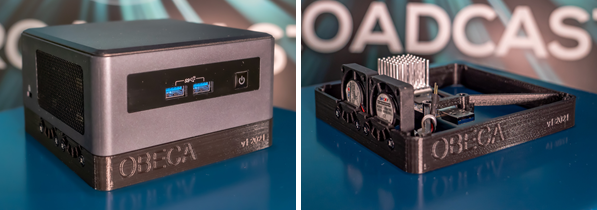
Figure: the ORS reference hardware setup.
| Component | Part | Approx. price (EUR) |
|---|---|---|
| Intel NUC | Intel Provo Canyon BKNUC8V7PNH | 600 |
| RAM | Crucial RAM CT16G4SFRA266 16GB DDR4 2666 MHz CL19 | 60 |
| SSD | SanDisk Extreme PRO M.2 NVMe 3D SSD 500 GB interne SSD | 70 |
| Power cord | LINDY 30406 - Power cord for notebooks (Schuko) 3m | 10 |
| Optional: | ||
| Display | Capacitive display 7" IPS 1024x600 | 70 |
The full specification of the Intel NUC 8 Pro Kit (NUC8V7PNH) can be found on the Intel ARK product database (search for NUC8V7PNH).
If you want to fully integrate the SDR into the NUC as seen on the picture above courtesy of Johann Mika: obeca-ors-casing
Testcases (reference setup)
The configurations below are the ones that have been validated on this reference setup. The Reference Tools system was tested live, with sample files, with bandwidths 3, 5, 6, 7, 8 and 10 MHz, subcarrier spacing (SCS) 1.25 and 7.5 kHz and modulation coding schemes (MCS) 1-26 with multiple services (RTP, HLS). Max CPU (2 services, 10 MHz, MCS26) was below 60%.
Virtual Environment
Ubuntu 20 with Hyper-V on Windows 10 has been tested.
Testcases (virtual environment)
The following was validated in a virtual environment: the build process and sample files (1 RTP service, 5 MHz).
Next steps
- To get started with a receiver-only setup, see SDR - HLS Playback over 5G Broadcast.
- Return to the Tutorials index.